Blocked creators
Last updated: October 6, 2026
Blocking a creator takes them out of the work Euka does for you: your agents stop contacting them, your email campaigns skip them, and they can't apply to your programs.
Why use it
Sometimes a creator isn't the right match for your brand anymore. Maybe a past collab didn't work out, or their content doesn't fit your products. Instead of skipping them by hand every time you build an agent, a campaign, or a program, block them once and Euka leaves them out until you unblock them.
Where to find it
- You block creators from Affiliate CRM > Creators.
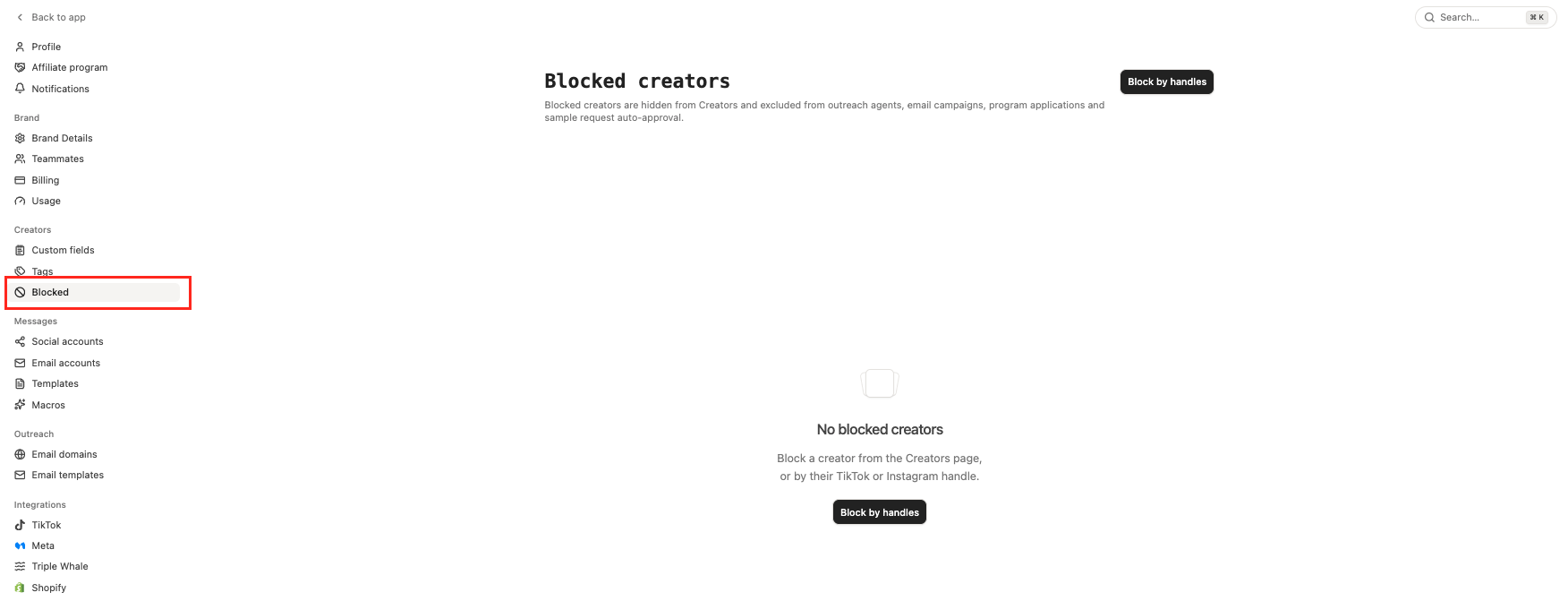
- You review and undo blocks on the Blocked creators page at Settings > Creators > Blocked. It lists each blocked creator, their email, and the date they were blocked, and you can also block creators there by their handles.
Who can use it
Blocking is in every plan.
What blocking does
As the page puts it: "Blocked creators are hidden from Creators and excluded from outreach agents, email campaigns, program applications and sample request auto-approval."
- They come off your Creators list. To see them, add the Blocked filter.
- Outreach agents don't invite or message them, whatever list, segment, or filter the agent targets. A new block reaches agents that are already running within about 8 hours.
- Email campaigns skip them, including follow-ups that were already scheduled. Campaigns recognize them by their TikTok account, their Instagram account, and their email address.
- They can't apply to a program, accept a program invitation, or join through your application page.
- Auto Review agents leave their sample requests alone: those requests are neither approved nor rejected automatically, so they wait for you or expire with TikTok. See Auto Review agents.
Blocking is not deleting. The creator's history, past collaborations, and your conversations with them stay where they are, and a collaboration or program they're already in carries on.
How to block a creator
- Go to Affiliate CRM > Creators and click the creator to open their profile.
- Click the ⋮ menu at the top right of the profile, then click Block.
- In the Block creator window, click Block. You'll see "Blocked 1 creator", and the creator drops off your Creators list.
The window names the creator and says they "will stop receiving outreach and disappear from your Creators list. You can undo this under Settings → Creators → Blocked."
You can also right-click a creator's row and click Block. To block several at once, tick them, click Actions in the bar at the bottom of the page, and choose Block 3 creators (it shows the number you ticked). Either way, confirm with Block in the Block creators window.
How to block creators by handle
Use this when the creators aren't in your CRM yet, or when you're bringing a block list over from somewhere else.
- Go to Settings > Creators > Blocked.
- Click Block by handles.
- Paste TikTok or Instagram handles, one per line.
- Click Block. The button shows how many handles you pasted, for example Block 3.
Creators who aren't in your CRM yet are added and blocked in one step, so you can block someone before they ever reach out. We look up each handle on TikTok in your Shop's market first, then try whatever is left as an Instagram handle. The message afterward says how many creators were blocked, which handles we couldn't find, and which named a TikTok creator outside your market.
How to unblock a creator
- Go to Settings > Creators > Blocked.
- Click Unblock on the creator's row. To unblock several, tick them and click Unblock at the top, which shows how many you ticked, for example Unblock 3. You'll see "Unblocked 1 creator" (or "Unblocked 3 creators").
Once unblocked, they're back on your Creators list, and your agents, email campaigns, programs, and Auto Review agents can include them again.
You can also unblock from Creators: add the Blocked filter, open the creator's profile, click the ⋮ menu, and click Unblock. Right-clicking their row works too.
Rules and limits
- Settings > Creators > Blocked shows the 1,000 most recently blocked creators. Past that, a notice points you to the Blocked filter on Creators, which lists every one of them.
- A block belongs to one brand. Blocking a creator in one brand leaves your other brands alone.
- A block outlives the creator's record: if you delete them from your CRM, they stay blocked.
- Blocking takes effect right away in Euka, but an agent that's mid-run can take up to about 8 hours to pick it up.
FAQs
A creator disappeared from my Creators list. Why?
Someone on your team may have blocked them. Add the Blocked filter on Creators to check, or look at Settings > Creators > Blocked.
Does blocking end a collaboration we already have?
No. A block stops new outreach and new applications. A collaboration, program, or retainer the creator is already in carries on, so end that separately if you want it to stop.
Can a blocked creator still message me?
Yes. Blocking doesn't close the conversation, so their messages still reach your inbox. It stops what Euka sends on your behalf.
What's the difference between blocking and an excluded list?
An excluded list stops your outreach agents contacting the creators on it, and nothing else. A block goes further: it also covers email campaigns, program applications, and sample request auto-approval, and it takes the creator off your Creators list. See Creators and lists.
Can I block Instagram creators?
Yes. Paste their Instagram handles in Block by handles, or block them from their profile on Creators. A pasted handle is checked against TikTok creators in your Shop's market first, so if one of them uses the same handle, that TikTok creator is blocked instead. Otherwise the block goes on the Instagram account, and a TikTok creator with the same name in another market isn't blocked.
I manage more than one brand. Do I need to block a creator in each one?
Yes. Each brand has its own block list, so your other brands can still invite a creator you've blocked in one. Block them in each brand where you want them left out.
I blocked a creator and an agent still messaged them. How?
An agent that was already running can take up to about 8 hours to pick up a new block. If a message went out well after that, contact us at support@euka.ai with the creator's handle.