Shopify + DTC programs
Last updated: November 23, 2026
Let creators earn commission on sales from your own storefront. Shopify + DTC programs give creators tracking links and optional discount codes, track their orders, and combine payouts into bills you pay manually or by auto charge.
Open Campaigns > Shopify + DTC. Programs require Growth, Business, or Autopilot. The service fee is 1.5% of creator-driven sales, separate from creator commission, at the early-stage rate as of September 2026. Programs can charge and credit creators in US dollars or British pounds.
Not sure what the creator experience looks like from start to finish? Our Shopify DTC playbook walks you through every step, from the first invite to the moment a creator posts.
Connect Shopify
You need your store's name, the part after admin.shopify.com/store/ in your Shopify admin address, and a Shopify account allowed to install apps.
On Shopify + DTC, review and accept the fee, then click Connect Shopify. If your store is already connected, the button says Agree and set up my program instead and opens your prepared first program.
Enter your store name and click Request Shopify setup. Our team sets up a private Euka app for your store and emails you when it's ready to install, usually within one business day. You can leave the page; when you come back, it shows where setup stands.
When the page says Your Shopify app is ready to install, click Install in Shopify and approve the install. Shopify sends you back to Euka, and Euka finishes connecting your store.
If Shopify didn't bring you back, open Settings > Integrations > Shopify and click Connect Store. Installation alone does not finish the connection: the store is connected once it appears in Euka, and products, collections, and inventory then sync from Shopify.
The install link works for seven days. Brand managers get a reminder three days and one day before it expires. If it expires, the page says Your Shopify install link expired. Your app is still set up, so click Get a new link and we email a new one, usually within one business day. If you already installed the app, you don't need a new link: open Euka from your Shopify admin and Euka connects your store.
You can connect a store on any plan, but launching a Shopify program needs Growth or above. A Shopify store can belong to only one Euka brand; contact us at support@euka.ai to add another store to the same brand.
For a custom storefront or Awin setup, contact us for help.
Create a program
Use New Program, or Create your program beneath the connected store. You can run several programs with different terms. The standard setup is one page: name it, then use Edit beside any setting you want to change.
Setting | What to decide |
|---|---|
Program type | Sales tracking pays commission and can include samples. Sampling sends products without commission or tracking links. |
Creators earn | Default is 10% of sales. Set another rate, or choose payment per click, conversion, or conversion plus sales. |
Automatic links | On by default. Turning it off means you must create each creator's link before they can sell. |
Shoppers get | Their own one-time code (the default), Full price, or A code to share. Set discount, products, and any per-shopper usage limit. |
Link format | How creators' links are named, and their code with a code to share (Link and code format). The default, First name + last initial + number, gives a link ending in sarahc48213 and the same code, SARAHC48213. Codes use only letters and numbers. Product links get their own number. |
Creator names | On for new programs. With a code to share, Creators can customize their code lets creators rename their code. With one-time codes, Creators can customize their display name lets them choose the name shoppers see in the discount popup. See When a creator changes their code or display name below. |
Free sample | Off by default. On a sales tracking program, creators in the program ask for a sample whenever they want one, within an allowance you set, and you approve each request. See Free samples on request below. A sampling program sends each creator a sample as one of its steps: choose the products, or let creators pick within item and value limits. |
Creator post | Required holds a creator's commission until they link an Instagram post about you. Otherwise Not required. See "Require an Instagram post" below. |
Joining | New programs allow Anyone on Discover and automatic applicant acceptance. Turn that off to review applicants, or choose Only creators you invite. Invitations remain available. |
Questions and social accounts | Name and email are always collected. Add phone, address, custom questions, or required TikTok/Instagram connections. Samples always require an address. |
Payment | Select a card or US bank account for commission bills. Sampling-only programs do not need one. |
Bills | Weekly by default, or every two weeks or monthly. |
Return window | Optional waiting period before an order's commission becomes payable. |
For a sales tracking program, open Joining and enter a Brand terms URL if you want creators to agree to your terms. Use Test to open the link and check that creators can read it. New applicants and invitees must agree before they can submit or join. Changing the link does not ask creators who already joined to agree again.
The program starts with each shopper's own one-time code for 10% off everything. One-time codes require SafeLink discount enabled in Shopify's theme App embeds; until it is, Shoppers get asks you to turn it on, using the steps in Turn on SafeLink for the first time below. Full price needs a store that can track link-only sales.
A code to share can also be limited to new customers with Limit to new customers, meaning shoppers with no past orders in your store. Shopify checks this at checkout using your store's Customers who haven't purchased customer segment, so keep that segment in Shopify under Customers > Segments. Euka doesn't check for it when you save the program. Without it, no code is created: generating links shows an error asking you to add the segment, and creators who join get no link even with Automatic links on. After you add the segment, select those creators and click Generate links. One-time codes can't be limited this way.
If creators in your program already have links and you switch Shoppers get between one-time codes and a code to share, Euka asks who the change is for: only creators who get a link from now on, or also creators already in. Either way, creators keep their link. A move doesn't change the discount shoppers get from a creator: if you set a different one for a creator, they keep it. One-time codes have no cap on total uses, so a cap set on a creator's code stops applying once they move. Moving creators already in to one-time codes turns off their shared code, even where they've posted it, and Euka emails them to share their link instead. Moving them back to a code to share gives each of them a new code by email, with the program's current limits, such as Limit to new customers. The move runs in the background, and Program Settings shows its progress, then lists any creator it couldn't move and why. For example, Euka can't turn off a code it only recorded when you imported creators, so those creators keep their code. Moving creators to one-time codes needs SafeLink discount turned on first. If it's off, the change isn't saved.
Require an Instagram post
On a sales tracking program, Creator post (in Program Settings, under Organic promotion) lets you ask each creator for an Instagram post about your brand before their commission is paid. Choose Require a post, or leave it Not required so commission pays as usual.

A post counts when its caption has any one of your Hashtags (optional) and mentions every one of your Required @mentions (optional). Add at least one of either, up to 10 of each. Euka fills in your brand's Instagram handle to start. Instagram feed posts and Reels count; Stories and TikTok videos don't.
The creator links their post in the creator app. A post from the auto-DM flow links itself.
Euka checks the post 7 days after it's linked. If it's still live and still has your hashtag or mentions, it's Verified and the commission on hold goes on the next bill.
Until then, commission the creator earns is held off the bills. Euka reminds the creator 7 and 12 days after they reach the post step. Nudge sends a reminder yourself, at most once a day.
With no post 14 days after the creator reached the step, it's overdue. Choose Release to pay what's on hold, or Keep holding. A post linked later still releases it on its own.
Flag post rejects a linked post, for example one about another brand, with a reason and an optional note the creator sees. They're asked to link another, and commission not yet billed goes back on hold.
Linked posts show on the program's Posts tab and on the creator's collaboration under Posts. If you turn this on for a program that already has creators, Euka asks whether only new creators need to post, or also creators who haven't finished. Turning it off releases everything on hold.
Add a description and optional cover; PNG, JPG, and WebP work, with 1680 × 800 recommended. Creator preview shows how the program appears. Invite-only programs are not listed on Discover.
Check the bottom bar for unfinished setup, then click Create program. An expired card or unverified bank account cannot be selected. Unsaved setup stays in this browser for seven days, not across your account or teammates; Discard starts over.
Turn on SafeLink for the first time
SafeLink is what gives each shopper their own one-time code, so it needs a one-time setup in Shopify before those codes can work. You'll find each step in the blue banner under Shoppers get in your program settings.
If the banner says Reconnect Shopify to check setup, Euka needs one more permission so it can check your theme. Click Reconnect Shopify to open Settings > Integrations > Shopify, then click Connect Store and connect the same store again. Don't disconnect your current store first.


Shopify shows the access Euka is asking for. Review it and click Install.
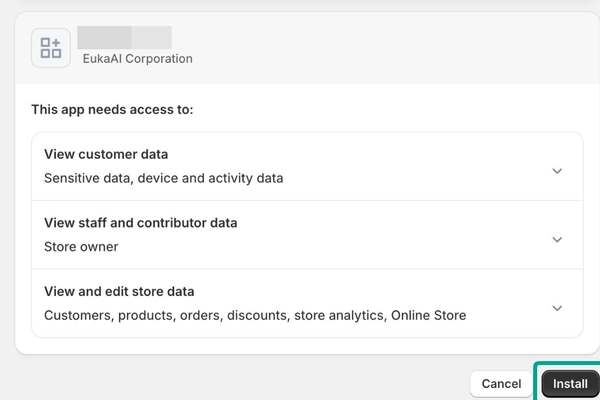
Back in Euka, the banner changes to One-time Shopify setup. Click Open Shopify setup to open your theme's App embeds, turn on SafeLink discount, and click Save in the top right corner.

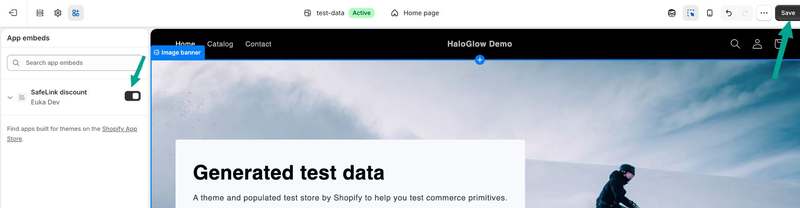
Return to Euka and click Refresh status to confirm SafeLink is on.
If the banner already says One-time Shopify setup, your store has the permission it needs, so start at Step 3. Keep SafeLink discount turned on for as long as any of your programs use one-time codes, and if you switch to a different Shopify theme, repeat Steps 3 and 4 on the new one.
Your prepared first program
After the catalog syncs, Euka can prepare your first sales-tracking program with suggested wording, offer, samples, and creators. It opens as guided Steps while the brand has no program and no conflicting saved draft. Review and change each recommendation before publishing.
The Creators Step can include two independently enabled invitation groups:
Customers identified as creators you have not worked with: all are invited when the program is created.
Up to 1,000 matched creators: invitations send at 100 per day, best matches first, starting on creation day. Matches have email, are in the store's country, have 5,000–1 million followers, and are new to your brand. Customer-creators are excluded from this second group.
Blocked or removed creators are skipped. Invitations pause with the program, stop after archive, and expire from the queue after 60 days. Preview shows how many the final create action will invite. Review both switches, especially after restoring a saved draft: turning invitations off is not preserved in that draft.
This guided setup starts creator referrals at 3% for each invited creator's first 12 months, paid in addition to their commission. Change or turn that off under Invites, which also offers Include TikTok Shop sales when your US TikTok Shop is connected. Invite-only programs do not offer that Step. Other defaults include weekly bills and auto charge off.
Suggested wording is in English. Featured products and creator topics appear on the creator-facing page; contact support to change those after creation. If the guided setup does not appear, your brand may already have a program, a standard saved draft, or a disconnected source store.
Invite creators or accept applications
Use existing CRM creators, AI Creator Search, customer matches on Overview, imports, or a public application page. Application and invitation pages can use your branding and be embedded on your website; they retain a Powered by euka link.
Enroll creators inside a program searches your creators, all TikTok creators, or an email address. Click Invite on a result to invite them; the window stays open so you can invite several. Ticking Add to program directly changes the button to Add, which starts the first stage immediately for a linked creator account and can begin contacting them. If their account is not linked yet, Euka invites them instead. Existing members or pending invitations are unchanged; a creator who declined is not added or re-invited. If no email or TikTok channel is available, add an email first.
From Affiliate CRM > Creators, select creators and use Invite to program for invitations they must accept. Copilot can also add creators after approval.
Prospects > Invitations/Applications shows social profiles, followers, TikTok Shop GMV (30d) (the creator's sales across every TikTok Shop over the last 30 days), sample posts, and missing required accounts. Applications initially use profiles when fewer than 20 exist, then a table; you can switch views. Search by name, email, or handle in table view. When the program asks for an address, the table shows each applicant's Country.
Find creators among customers
Euka matches Shopify customers to known creators and emails you once if matches are found. Overview > See who they are lists matches by audience size and offers a bulk invitation action. The section disappears once everyone listed is invited.
The initial import covers up to 250,000 customers who ordered. If fewer than 100,000 have ordered, it adds other customers up to 100,000 total. More customers arrive as they order. The first import can take time; no customer is contacted just because they were matched.
Invite customers after they buy
Your order confirmation page can show buyers a card inviting them to become creators for you. On a program open to Anyone on Discover, click Edit next to Joining and turn on Customers can apply after they buy.
The card needs a one-time setup in Shopify, after you save the setting on a live program; until then it shows nothing. Use Open Shopify setup to open Shopify's checkout editor, add the Euka creator invite block to the Thank you page, and click Save. Back in Euka, Refresh status confirms the card is in place.
A buyer who came through a creator's link or code applies to that creator's program if it takes customers. Everyone else applies to your newest program with the setting on. The card hides itself while none of your programs takes customers, for example while they're paused.
Move from another affiliate tool
Import a CSV with email, first name, last name, and discount code. Linked creator accounts start the program; others get an email invitation, with their code retained until acceptance. Declined invitations are skipped. Fix rejected rows using the downloadable error CSV.
Existing discount codes carry over, even when the old tool kept many creators' codes in one Shopify discount. When a creator's link is created, their code moves to its own discount with the program's settings, and the other codes keep working. With Automatic links on, this happens on its own when the creator joins. Otherwise, select them and click Generate links. Creators receive new Euka tracking links. Ask them to update bio and story links. Turn off the old affiliate program to avoid both tools crediting the same Shopify orders.
Send samples
A program sends samples in one of two ways. With Free sample on a sales tracking program, creators ask for a sample whenever they want one, within an allowance you set. A program with a sample step, such as a sampling program or a prepared first program with a sample, sends each creator a sample as they work through its steps. Either way, approving creates the order in your Shopify store and you ship it as usual.
Free samples on request
Creators often want to try a new product, or need a refill before their next video. With Free sample on, they can ask for one from the program's page in the creator app at any time while they're in the program, and you decide on each request.
Turn it on with the switch beside Free sample when you create the program, or later in Program Settings. Then set the allowance each creator gets:
What they can pick from: Your whole catalog, or Only products you approve, where you pick the products and sizes.
Items per creator: up to 20. The default is 1.
Spend cap (optional): the most a creator's samples can be worth, in your store's currency.
How often: Once, or every 30, 60, or 90 days. The default is every 30 days. The period starts at the creator's first approved request.
Creators can split their allowance across several requests. Denied and expired requests give it back. Changes apply to new requests; requests already sent keep their products.
Review requests on Shopify Sample Requests, which lists every Shopify sample request across your programs and your Meta Ads Ads Program. A program's Samples tab shows the same list for that program only, with how many wait for review. The top of the page shows how many samples are waiting to ship, how many shipped this month, and their value. Each creator row shows their followers, Brand sales (what they've sold through your Shopify + DTC programs), Samples received, and Posts since last sample, so you can see who posts after a sample. Use Requested from to filter by program.
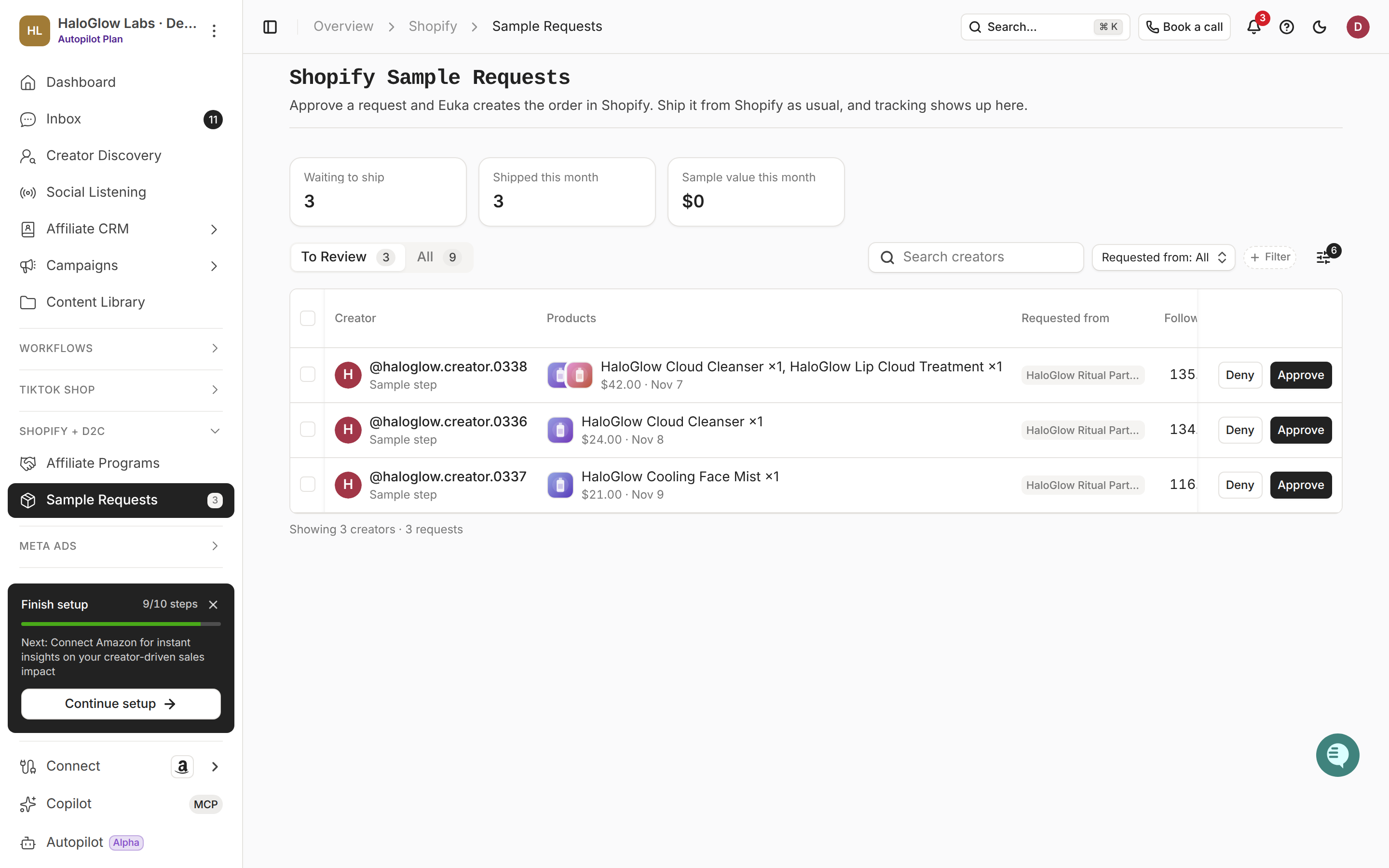
Approve: Euka creates a $0 order in your Shopify store, tagged Euka-free sample, one per creator and program. Ship it from Shopify like any other order. Tracking appears in Euka once Shopify shows it shipped, and the request moves to Shipped, then Delivered. Open in Shopify opens the order.
Deny: you can pick a reason, Not a fit right now, Out of stock, or Other, but you don't have to. The creator sees the reason if you pick one; otherwise they're only told the request wasn't approved. Either way, they can ask again.
Do nothing: a request a creator asked for that you don't answer within 14 days expires, and the creator gets their allowance back. Rows labelled Sample step come from a program's sample step instead. When the creator picked their samples, those expire after 14 days too, and the creator picks again. When you chose the products, they stay in To Review until you answer.
Select several requests, or everyone on a page or across pages, to approve or deny them together. If Shopify can't create an order, for example because a product is out of stock, or the creator's name or shipping address is incomplete, the request stays in To Review with the reason and a Retry button. If you cancel a sample order in Shopify, the request goes back to To Review so you can approve it again.
Creators get an email and an app notification when you approve or deny their request, when it ships, when it's delivered, and when it expires.
Sample steps
On Collaborations, review the creator's selected items and retail value, adjust if needed, then Approve & create order. These creators also appear on Shopify Sample Requests labeled Sample step, and you can approve them there instead. Denying one there skips their sample step, so they move on without a sample. If you don't create the order within 14 days of a creator picking, the pick expires: the creator is told and picks again. Ship to shows the name and address the order will go to. Shopify receives a sample order with a 100% line discount. Pack and ship through your normal process.
Creators need a complete shipping address before they can pick their samples; when your record of a creator has no address, Euka uses the one saved in their creator profile. Creators see this address on their sample step and can change it until you create the order. A change updates your record of the creator and their profile, and Ship to then shows Updated by creator with the date. Once the order exists, creators are asked to message you if the address needs to change. With a connected TikTok Shop, samples ship only to the countries of your TikTok Shops. A US brand also ships to Puerto Rico, Guam, the US Virgin Islands, American Samoa, the Northern Mariana Islands, Micronesia, the Marshall Islands, and Palau, and a UK brand to Jersey, Guernsey, and the Isle of Man. A creator outside those countries is told so when they try to pick, and can't change their address to one there. With automatic applicant acceptance on, an applicant whose address is outside those countries doesn't join automatically: their application waits in Applications for you to approve or reject it. Without a TikTok Shop, Euka doesn't limit the country, so check that you ship to a creator's country before you create their order.
If a creator still has no address, or their address is in another country, Approve & create order says so and the creator stays on Create Order. Add the address to their profile in Euka and create the order again. Euka drops emoji from names before sending them to Shopify, which refuses them; if nothing is left, add a first and last name to the profile. Approving several creators at once places the orders it can and leaves the others on Create Order with the reason. If Shopify refuses an order, Euka shows Shopify's reason and the creator stays on the same step.
If you cancel or delete a sample order in Shopify before it ships, the creator goes back to Create Order, so you can place it again or skip the step.
Ship the order from Shopify. Fulfilling it there syncs status and tracking back to Euka, and the creator moves on from Fulfill Order once Shopify shows the order shipped. Once the whole order has shipped, Euka completes Awaiting Delivery when every shipment is delivered. A shipment with no carrier status is treated as delivered after 30 days from shipping, checked daily. A shipment still in transit or with a delivery exception keeps the step open. Either side can still confirm receipt with Mark delivered.
Require an Instagram post
When you send free samples, you want a post in return. Creator post holds a creator's commission until they link an Instagram post about you and it's still up seven days later. It's available on sales-tracking programs, not on sampling-only ones.
In setup, Creator post is under Organic promotion, after Who can join, and reads Required or Not required. Click Edit and turn on Require a post before commission is paid. When a program sends its sample as a step, as your prepared first program can, it's turned on and marked Recommended; set Not required if you don't want a post. The guided first-program setup asks the same question in its Creators post before they get paid Step. With Not required, creators can still link posts to show you their work, and nothing is held.
Then tell creators what the post must say. A post counts when its caption uses any one of your Hashtags and mentions every one of your Required @mentions. For example, with #glowco and #glowskin as hashtags and @glowco as a mention, a post needs @glowco and either hashtag. Add at least one hashtag or @mention, and up to 10 of each; capitals don't matter. The @mention starts out as your brand's Instagram handle when Euka has it. Handles can have letters, numbers, _, and dots; hashtags can have letters, numbers, and _. Instagram feed posts and Reels count. Stories and TikTok videos don't.
What creators do
Post Verification is the program's last step, after the link and any sample.
The creator connects Instagram in the creator app and picks one of their 12 most recent posts and Reels. A post made before they got their tracking link doesn't count, and neither does one already linked to another program.
Euka checks the caption right away. If it's missing your hashtag or an @mention, they edit the caption on Instagram and check again.
They confirm they posted it for you on their own account. When they got more than one product (or, without a sample, the program shares more than one), they can tick which products are in the post.
Seven days after linking, Euka checks that the post is still on Instagram and that its caption still has your hashtag and @mentions. If so, the post is verified, the step completes, and the held commission goes on your next bill.
If the post was deleted, or the creator took your hashtag or @mention out of the caption, it no longer counts and the creator is asked to fix it. They can link another post, or put the tag back and link the same post again. Either way the seven days start over. If you change your hashtags or @mentions later, posts already linked aren't turned down for missing the new ones.
Creators can link their post before they reach the step. If it's verified by then, the step completes as soon as they get there.
For the first 30 days after a creator links a post from their connected Instagram account, Euka refreshes its views, likes, and comments daily while the collaboration is active or completed. These numbers can lag behind Instagram. If a refresh is unavailable, Euka keeps the latest numbers it has. The separate seven-day check still applies for post verification and commission release.
A post that runs your Comment-to-DM for a creator links itself, skips the caption check, and gets the same seven-day check. If the creator's Instagram disconnects before the check, the post shows "Can't check yet: the creator's Instagram is disconnected." The check waits for them to reconnect, and their commission stays held.
What's held
From the day a creator joins, everything they earn in the program that hasn't been billed yet is held until their post is verified or you release it. That covers commission on sales and clicks, and any referral reward another creator earns on their sales. Rewards the creator earns for inviting others aren't held. Their orders show On hold · no post once any return window has passed.
Commission is held whether or not the creator has connected Instagram to Euka, and stays held if they disconnect it before their post is verified.
Follow up on missing posts
The Post Verification step has Waiting for Post, Checking, and Overdue tabs. All three show each creator's sales and On hold amount. Waiting for Post adds Deadline and Last reminder, and Overdue shows when the Deadline was.
Deadline: 14 days after the creator reaches the step. Without a linked post by then, they move to Overdue. A post linked later still goes through the seven-day check and releases their commission once verified.
Reminders: Each time a creator reaches the step and still needs to link a post, Euka emails them and notifies them in the app right away, with their 14-day deadline. Creators can't turn off this notice. It isn't sent if their post is already being checked or verified, or you've released them. Euka then reminds them on day 7 and day 12, while no post is linked. On Waiting for Post, Nudge sends another reminder to the creators you select, at most once every 24 hours per creator, counting automatic reminders. Last reminder shows the date and whether it was automatic or manual.
Overdue: it's your turn. The creator's status reads "Decide on the held commission", with a line giving the amount on hold, or "Decide on the missing post" when nothing is held. Release it, or keep waiting for a post.
Release held commission
You can release a creator's held commission at any time. It goes on your next bill. While a creator owes you a post, you can't use Mark Complete on them or skip their Post Verification step. To pay them without a post, release their commission.
At the step: select creators on any of the three tabs and use Release in the selection bar, which shows the total, such as Release $197.40. You can also click a creator and release from their status. Their step completes, reminders stop, and a post they link later is optional. On Waiting for Post and Checking, the bar offers this only for creators whose commission is being held.
Before the step: click the creator and, in their Posts section, use Release with the amount (or Release held commission). They won't need a post for this program, and what they earn is billed as usual.
After the step: release it from the same Posts section, for example for a creator who left the program.
See and flag posts
Click a creator to see their Posts section, below Results. It shows every post linked to the program, picked by the creator or from Comment-to-DM, with its status (Checking, Verified, Deleted, Caption changed, or Flagged) and its plays, likes, and comments. Comment-to-DM posts also show orders and sales. Click a post to open it on Instagram.
The program's Posts tab shows the same posts for every creator as cards, with each post's views, likes, and comments. Search by creator and filter by Linked by (Comment-to-DM or Creator). Switch to the table to also compare DMs, clicks, sales, and earnings. Click a post to see it larger, with its caption and numbers, and to open it on Instagram. A post the creator picked shows a dash for those until they add your Comment-to-DM caption line to it. Until then, its sales count toward the creator's link.
Posts picked from connected accounts are checked automatically. Creators can also submit a full post URL without connecting an account. These show Awaiting brand review and never pass automatically. Open the creator’s Posts section, review the linked post, and choose Approve post if it belongs to that creator and meets your rules. Approval releases commission held for that post requirement. Otherwise, flag it and ask for another post. Open the post's menu in the creator's Posts section or on the Posts tab and choose Flag post. Pick Not about our brand, Post was deleted, or Other, and add a note if you like. The creator sees the reason and your note and is asked to link another post. A flagged post no longer counts, and it can't be linked to this program again.
You can flag a post after it's verified too. Commission that hasn't been billed yet goes back on hold, unless the creator has another verified post or you already released it. When it does, a creator who had finished the program goes back to the Post Verification step, with 14 days to link another post.
Turn it on or off later
Change Creator post in Program Settings. If you turn it on while creators are already in the program, saving asks Who needs to post?
Only creators who join from now on, the default. Creators already in the program are paid as usual.
Also creators already in the program, including those who finished the program and still sell through their link. All their commission that hasn't been billed yet is held until they post. When you save, Euka tells creators who haven't reached the post step yet, by email and in the app, that you now ask for a post, and asks anyone who hasn't connected Instagram to connect it first. This first notice has no deadline. Creators who had finished go back to the Post Verification step shortly after, or once the program is active again if it's paused. Every creator who reaches the step and still needs to link a post gets a notice with their 14-day deadline, including those told when you saved. The usual reminders and Overdue apply. If their post is already being checked or verified, this notice isn't sent. Once their post is verified or you release them, they finish the program again.
Turning it off releases all commission held for a post, and creators at this step move on.
Track orders and creator progress
Overview shows invited, applying, active, and in-progress creators, sales, recent orders, and activity. Collaborations shows individual steps. Samples appears once you've turned on Free sample and lists the program's sample requests. Posts lists the Instagram posts linked to the program, by creators or through Comment-to-DM. Referrals appears when enabled, and Payouts shows bills and payments.
To narrow a program's creators to the ones you want to act on, use Filter on Collaborations. It offers the filters from Affiliate CRM > Creators, such as tags, lists, segments, and Instagram numbers. With a connected TikTok Shop it also offers TikTok numbers and Sample Status, which tells creators who already got your product on TikTok Shop from new ones.
Filters stay while you move between the program's steps and clear when you leave the program or reload the page. The counts next to each step still include every creator, and Invitations and Applications have no filter.
Every step also shows the TikTok sample status and Products sampled columns, which come from the sample requests creators send to your TikTok Shop, through Euka or not. A Shopify sample order from a program doesn't appear there, and without a connected TikTok Shop both columns stay empty. Products sampled lists the products whose latest request was approved, including ones not shipped yet.
Sales tracking defaults to 30 days, with other ranges and All time available. Charts show sales, orders, or clicks; striped periods are still in progress. Comparisons use the preceding equal-length period, except All time. Top creators ranks sellers and separately counts working links, creators with clicks, and creators with sales. These are not a funnel: a discount-code sale can have no click.
View all orders filters by dates, creator, order number, customer email, or discount code. The creator picker lists up to 100 top sellers; use discount-code search for others. Tabs split orders by commission status; On hold appears when some orders are held for a post. Expand an order for its items or open its number in Shopify.
For new Shopify orders where shoppers can enter a creator's discount code at checkout, Via link · Code means Euka matched the checkout to that creator's tracking link. Code means Euka credited the order using the discount code alone.
Order status | Meaning |
|---|---|
Return window | Commission is waiting for the refund window to end. |
Awaiting approval | An affiliate network has not finalized the sale. |
On hold · no post | The creator owes a post, so commission waits until it's verified or you release it. |
Ready to bill | Commission is eligible for the next bill. |
Billed | Included on a bill. |
Paid | Creator commission has been paid. |
Cancelled or Refunded | The order no longer earns commission. |
Commission cancelled | You ended the creator for a rule violation. |
Activities highlights Your turn with actions such as creating a link or order, approving a request, fulfilling a sample, or reviewing content. Click a creator for current status, Steps, Results, Posts, Link and code, and History. Manage holds Skip this step, Undo skip, Move to Stage, Mark Complete, Terminate, End for rule violation, and Restart when applicable.
Remind creators who haven't shared their link
When creators have their tracking link but no clicks on it yet, Overview says how many, for example "3 creators joined but haven't shared their link". Click Remind (for example Remind 3 creators) to send each of them a message from you in Euka Chat and an app notification, with their link and your best-selling TikTok Shop videos as examples. A creator gets at most one reminder a week, counting the automatic ones: Euka also reminds creators 3 and 7 days after their link is created if it has no clicks. Each Monday, the program's watchers get an email with how many creators haven't shared yet and a link to the program.
Skip a step
When a creator doesn't need their current step, for example a sample they already have or a contract signed elsewhere, open Manage > Skip this step. The creator moves on to the next step, or, on the last step, finishes the program and moves to the Active list with their tracking link and commission still working. You can leave an optional note. Euka tells the creator in their notification and on their program page, with your note. To skip the same step for several creators at once, select them on Collaborations; the option appears when everyone selected is on the same step.
What skipping leaves behind depends on the step:
TikTok sample: the invite stays open in TikTok Shop, and TikTok keeps approving sample requests on it automatically unless you turned that off.
Contract: the signature request is canceled.
Content review: drafts the creator already submitted stay as they are.
Payment and offer steps can't be skipped. Neither can Post Verification while the creator still owes you a post: release their held commission instead. Neither can a sample that already has a Shopify order, has shipped, or that the creator requested: fulfill or reject it instead.
Undo skip sends the creator back to the skipped step, as long as nothing has happened on the step they moved to. Anything that step sends when it starts, like a request to pick a sample, goes out again. A skip can't be undone once it finished the program, or when the skipped step was a TikTok sample or content review.
To change a creator's shared discount code or what shoppers get with it, click Edit beside Discount code under Link and code. In Update discount code, the creator keeps their current code unless you change it. If you do change it, the old code stops working, so ask the creator to share the new one.
Under Link and code, Traffic sources lists the sites shoppers came from before opening the creator's link, such as linktr.ee, Facebook, or a coupon site, with clicks, orders, and sales for the Results dates. Direct or unknown covers typed or pasted links, apps that don't pass on where a click came from, orders placed with the creator's shared discount code, and every click before October 15, 2026. A creator whose clicks come mostly from coupon or deal sites is marked Needs review, as explained below.
Creators see links, clicks, orders, and earnings in their app. Commission moves from Estimated during the return window to Pending payment and Cleared when available. While a creator owes you a post, their app shows that commission as On hold once the return window has passed. Product links rank by sales, then clicks.
How sales and clicks are credited
Shopify orders usually appear within about a minute. A creator discount code takes priority; without one, the tracking link identifies the creator. Link tracking remembers the creator in the shopper's browser for 30 days and can miss a sale when cookies are declined, the device changes, or that period expires.
Shopify commission uses product value after discounts, excluding shipping and tax. A 15% shopper discount reduces that commission base by 15%.
Clicks count once per creator and shopper per day. Social and messaging apps fetching a link preview do not count as a person clicking, including for per-click payments.
When a creator changes their code or display name
With Creators can customize their code on, creators can rename their shared code from Your links in the Euka creator app, up to three times in 30 days. A tracking link that uses the code's name updates with it, and the old link keeps working and counting clicks, so creators don't need to edit their link separately. The renamed code replaces the old one, which stops working at checkout, and orders already placed with the old code stay credited to the creator.
New codes use 4 to 30 letters and numbers. Euka doesn't accept codes that include your brand's name or Euka's, start with FREE, or contain profanity. Codes with a usage cap or a once-per-shopper limit can only be changed by you.
Each time a creator renames a code, the program's watchers get an email and a notification in the bell at the top of Euka, so you can update the code anywhere you show it. Each watcher can turn these off with Creator changed their code in Settings > Notifications.
With one-time codes, the setting is called Creators can customize their display name. Creators choose the name shoppers see in the discount popup, and changing it doesn't change their tracking link.
Both settings are on for new programs. To turn one on for a program you already have, open Program Settings, click Edit next to Shoppers get, and switch it on. With Full price, creators only get a link, so the setting doesn't appear.
Creators who need review
Coupon and deal sites sometimes join a program as creators and earn commission on shoppers who were already going to buy. Once a day, Euka checks where each creator's clicks came from. When coupon or deal sites sent at least half of a creator's clicks with a known source, and at least 5 of them, Euka marks the creator Needs review. Clicks under Direct or unknown aren't counted. The mark is only for you: nothing changes for the creator, and their link keeps working.
On Collaborations, the notice says "N creators need your attention." Choose Review creators to review them together, including creators who have finished the program's steps. Select a creator to see their traffic sources, unbilled commission, and why they were marked. For example, most clicks with a known source may come from one coupon site, and their account email may use that site's name. In the creator's details, the reason sits directly below their current status. The mark goes away on its own if later clicks bring the creator under that line.
Overview includes Needs review in the collaborations that need your action. When Euka can estimate when commission becomes eligible, it also shows the notice within the preceding 7 days. Payouts shows the notice before the payment action, including programs you bill manually. An eligibility estimate is not a promised payment date. Commission may still be on hold for a post, or the program may have no scheduled payment date.
The notice's close button only hides the reminder. It does not review the creator or change their commission. A new mark brings it back, as does entering the 7-day reminder period when an eligibility estimate is available.
If the traffic is fine with you, choose Not an issue. The mark goes away, and Euka won't mark that creator again in this program. If they broke your program's rules, choose End for rule violation beside the reason they were flagged. This ends the collaboration and cancels commission that hasn't been included in a bill; the confirmation shows the amount.
End a creator's collaboration
To stop working with a creator, use Terminate under Manage, or select several creators on Collaborations and choose Terminate. Pick a reason from the list and add a note of up to 280 characters if you like; Other needs a note. Breaking your program's rules isn't one of the reasons: use End for rule violation for that, as described below. Euka emails the creator and tells them in the app, with your reason and note, and both show on their program page. A collaboration that had already failed ends without a message.
When a collaboration ends:
New sales and clicks from the creator no longer earn commission.
The discount code Euka set up for them in Shopify is turned off, so shoppers can't use it.
Commission already recorded for their orders stays billable: it goes on your bills as usual, and the creator is paid. Ending the collaboration also releases commission held for a missing post, so it's billed too.
A Shopify sample order that hasn't shipped is cancelled in Shopify, so your warehouse doesn't send it. Shopify doesn't email the creator about it.
The creator moves to Terminated. Restart brings them back from the first step and clears the reason. Their link and code are created again when they reach that step. If a post is still required and they have not met the requirement, their unbilled commission goes back on hold until they link a qualifying post or you choose Release. An already verified post still counts, and an earlier explicit Release still applies.
End a creator for a rule violation
When a creator breaks your program's rules, for example by posting their link or code on coupon or deal sites, use Manage > End for rule violation on that creator. It ends the collaboration just as Terminate does, and it also cancels their commission that isn't on a bill yet. It's offered one creator at a time, on programs that pay commission, while the creator is still in the program.
Pick the rule they broke, Coupon or deal sites or Other. You can add a note of up to 280 characters; Other needs one saying which rule. Before you confirm, Euka shows how much unpaid commission will be cancelled.
Commission is cancelled on orders still in the return window, on hold until the creator posts, or ready to bill, along with any pay-per-click earnings not yet billed.
Those orders show Commission cancelled to you, and they no longer count in sales totals or toward Euka's service fee.
Commission already on a bill stays, whether or not you've paid that bill, and the creator is still paid for it. To change a bill, contact us at support@euka.ai.
Referral rewards they earn for inviting other creators aren't affected. If another creator invited them, that creator's reward on these orders is cancelled with them.
Euka emails the creator and tells them in the app, with the rule, your note, and a line saying their unpaid commission from your program was cancelled. Their program page shows the same. They move to Terminated. Restart can bring them back, but cancelled commission and referral rewards stay cancelled. If a post is still required and they have not met the requirement, their new commission stays on hold until they link a qualifying post or you choose Release.
When a creator leaves
Creators can also leave your program from their app, while they're working through its steps or while their link is still earning. While an offer from you is waiting on their answer, they decline it instead, and you can send a new one. They pick a reason, such as no time or terms that don't work for them, and can add a note. Euka tells the program's watchers by email and in the notifications bell at the top of Euka, with the reason and note. Each watcher can turn these off with Creator left in Settings > Notifications.
Leaving ends the collaboration just as Terminate does: new sales and clicks stop earning, the discount code Euka set up for them is turned off, a sample order that hasn't shipped is cancelled in Shopify, and commission already recorded is still billed and paid, except what's held for a missing post. That stays held until a post they already linked is verified or you release it in their Posts section. The creator moves to Terminated, and their status and History say they left the program, with their reason and note.
Restart isn't offered for a creator who left. If they left by mistake, contact us at support@euka.ai.
Pay commission bills
Choose USD, GBP, or EUR in the program's payment settings before creators join. Your bills, fixed commission amounts, and creator credits use that currency. It cannot change after a creator joins or a bill exists. Existing programs stay in their current currency; contact us at support@euka.ai if you need help changing an existing program’s payment currency.
Sales billed in Euka must use the same currency as the program. Affiliate-network sales in another currency stay in reports and are excluded from the bill. Matching-currency commissions can still be paid. Euka does not convert or add commissions from different currencies into one bill. For Shopify and Custom Store, an order in another currency pauses automatic billing. In Payouts, you can choose to pay only commissions in the program currency for this bill. The other orders stay unpaid, with their original amounts and currencies.
Custom Store confirmations must include each order's actual checkout currency. Update older tracking snippets before using GBP or EUR. The current snippet skips orders whose currency is missing or invalid; it does not assume US dollars or use the program's currency. Older USD-only integrations can still report US-dollar orders without a currency. Verified confirms installation, not the correctness of every order's currency.
Commissions accrue on your chosen schedule. A return window delays billing and removes commission if the order is refunded within it. Without a window, or after it ends, a refund does not take back the commission.
In Payouts, review Accruing, In return window, and Refund verification needed. Click a creator to inspect orders. When creators still owe a post, Payouts also shows what's held, such as "$120.00 held until 3 creators post". That money stays off your bills until each post is verified or you release it. Bills separate creator commission, referral rewards if any, the 1.5% service fee on sales, and card processing fees.
About three days before each scheduled bill, the program's watchers (its admins when nobody watches it) get a Bill coming up email with the creators on it and their commission so far. A bill can't be changed once it's issued, so end any creator still in the program who broke your rules before then. You can turn this email off in your notification settings.
Payment method | Processing fee |
|---|---|
US bank account (USD only) | None. |
Card | 3.5% of creator payouts, including referral rewards. |
GBP and EUR bills require a card. A bill paid by card or bank account shows up as two charges on the same payment method, made together when the bill is paid, so a bank payment shows both debits at the same time. The first pays your creators' commissions and referral rewards. The second is Euka's service fee and any card processing fee. Both charges use the bill's currency. If either amount would be under $0.50, £0.50, or €0.50, the bill is one charge. Payment history shows the creator payment and fee charge separately. If the fee charge is declined, your creators are still paid, and Euka may retry the fee on the following days. Some declines, including a bank authentication requirement, need manual follow-up instead; contact support@euka.ai if the fee needs attention. If your bank returns the creator payment, a fee charge that went through stays paid, and paying the bill again charges only the creator payment; a fee charge that was returned too is charged again with it.
When your bank asks you to confirm a card payment, complete the verification that opens after you click Pay. If you close or fail verification, the bill remains unpaid and you can try again from Payouts. Automatic payments and AI tools cannot complete the bank's verification for you. They direct you back to the web app to pay.
Bills are due 14 days after issue. You can pay before then manually or use auto charge. After payment, creator funds become available once their creator-app account is linked to your brand record; an unlinked share waits safely for that connection.
An overdue bill pauses the program and stops sales tracking. Sales during the pause are not credited. Paying resumes it. Review the Payouts countdown and emailed reminders.
Use auto charge
In Program Settings > Payment, choose a payment method and enable Auto charge. Review the confirmation before Turn on auto charge. Bills are normally charged about a week after issue; the email provides the exact UTC date. Only the program's selected payment method is used.
You can pay manually before the charge date. A paid bill is not charged again; a failed manual attempt leaves the scheduled attempt in place. Turning auto charge on with a waiting bill charges it immediately.
Turning auto charge off can also charge a waiting bill immediately. On an active or paused program, the confirmation shows the bill and notifies creators of the schedule change. Future bills become manual. If that final charge fails, auto charge still turns off and the bill remains payable in Payouts. To question a bill before it is charged, contact us at support@euka.ai instead of relying on the off switch.
Payment-method changes and confirmed auto-charge changes save immediately. Changing billing frequency uses Save schedule. A payment method used by an active or paused program cannot be removed from Billing until another is selected.
Failed automatic payments
Euka emails you after failure. Temporary card declines may retry at the daily 9 AM UTC run, up to three times and never after the due date. Other card declines do not retry. A failed bank payment gets at most one further attempt before the deadline.
Open Payment to inspect The last charge failed. Updating the method while auto charge is on immediately charges the waiting bill; with it off, pay through Payouts.
Creators see Paid automatically while auto charge is active. If a bill is still unpaid four days before its due date, the badge disappears until payment, even if retries continue. At the due date, unpaid bills pause the program.
Offer creator referral rewards
In Program Settings > Creator referrals, choose Turn on, set a reward from 0.5% to 50%, and select 3, 6, 12, or 24 months, or no time limit. Save referrals adds the Referrals tab. Tell creators their link is available under Your links > Invite creators; enabling it sends no notification.
Referrals require a Shopify sales-tracking program open to Anyone on Discover. They start off in standard setup and on in the prepared first-program setup described above.
Only current program members can invite. The applicant must be new to all your brand's programs and cannot refer themselves: an applicant who gives the inviter's first and last name, or the inviter's shipping address, counts as the inviter, so the invite doesn't count. The first invite link they apply with wins; rejected applications do not count. Each creator has one fixed inviter. Contact support if attribution appears wrong.
Rewards begin when the referred creator joins. Shopify link-sale rewards use the same discounted product-value basis as commission, excluding shipping and tax. Inviters earn from direct referrals only, not later generations.
Each referral keeps its original rate, duration, and TikTok Shop setting. Changing terms or disabling referrals affects new referrals only; existing rewards continue, even if the inviter later leaves. Refunds inside the return window remove rewards, and link sales during a program pause earn none.
Rewards share the regular commission bill. Referred sales count once for the 1.5% service fee, so referrals add no duplicate service fee. Card processing remains 3.5% of all payouts.
Include TikTok Shop sales
If your US TikTok Shop is connected to Euka, turn on Include TikTok Shop sales in the same settings of a USD program. These rewards are in US dollars and cannot be combined with a GBP or EUR bill. Inviters then also earn on invited creators' TikTok Shop sales for your brand, at the same reward and time limit, while those creators stay in your program.
Only creators new to your TikTok Shop count. The day after a creator joins, Euka checks whether they sold for you on TikTok Shop in the previous 90 days; if they did, only their link sales earn rewards. The check runs only while your US TikTok Shop is connected.
Sales are matched to the TikTok account on the creator's Euka profile. Until they add one, their TikTok Shop sales earn nothing; once they do, sales since joining count. After the check, only that account counts, even if they switch.
A sale counts once TikTok settles it, usually 20 to 40 days after the order (as of October 2026), on the amount TikTok pays commission on after refunds. Your return window doesn't apply, and these sales still earn rewards while the program is paused.
The reward doesn't change the creator's own TikTok Shop commission, which TikTok pays.
On the Referrals tab and in Payouts, amounts that include TikTok Shop sales are underlined. Point at one to see the link and TikTok Shop parts.
Change settings and understand permissions
Use Program Settings > Edit, then save the setting. New rates, discounts, and link formats affect new links; existing links and codes keep their terms and names, and links creators already shared keep working. When you change a creator's discount, their code keeps its name. Store, program type, and sample/link order are fixed at launch. A sample step can't be added after launch, but a sales tracking program without one can turn Free sample on or off, or change its allowance, at any time. Creator post can change any time; see "Turn it on or off later" above.
A return window can be increased but not shortened or disabled. Pay open bills before increasing it, and pay already earned commissions before first enabling one on a running program.
Shopify permissions let Euka sync products and inventory, read orders/refunds, create and track sample orders, identify customer-creators, create discounts, run link tracking, and check SafeLink's theme embed. Euka does not edit or fulfill ordinary customer orders; matching a customer to a creator does not contact them.
For a missing sale, check the store connection, creator link or code, and program billing status. Link-only tracking also depends on the shopper's browser. If those look correct, contact us at support@euka.ai with the Shopify order number.
Archive a program
In Program Settings, choose Archive program and confirm. The program leaves your program list and stops accepting new creators, including people with an existing invitation.
Existing collaborations, tracking links, commissions, and scheduled payments continue under their current terms. Archiving keeps the program and its history; it does not cancel work or stop charges. You can still open the program through its existing link. There is no restore button in the app.