Meta Ads Autopilot
Last updated: November 25, 2026
You have hundreds of licensed creator videos and no time to launch each one as an ad, watch the numbers, and decide what to pause. Autopilot does that for you. It runs your licensed videos as Facebook and Instagram ads a few at a time, inside a budget you set, keeps the ones that sell, and stops the ones that don't. It checks every hour, so you don't launch or pause anything yourself, and you can pause it or change its settings any time.
Find it on the Autopilot tab in Ads > Meta Ads.
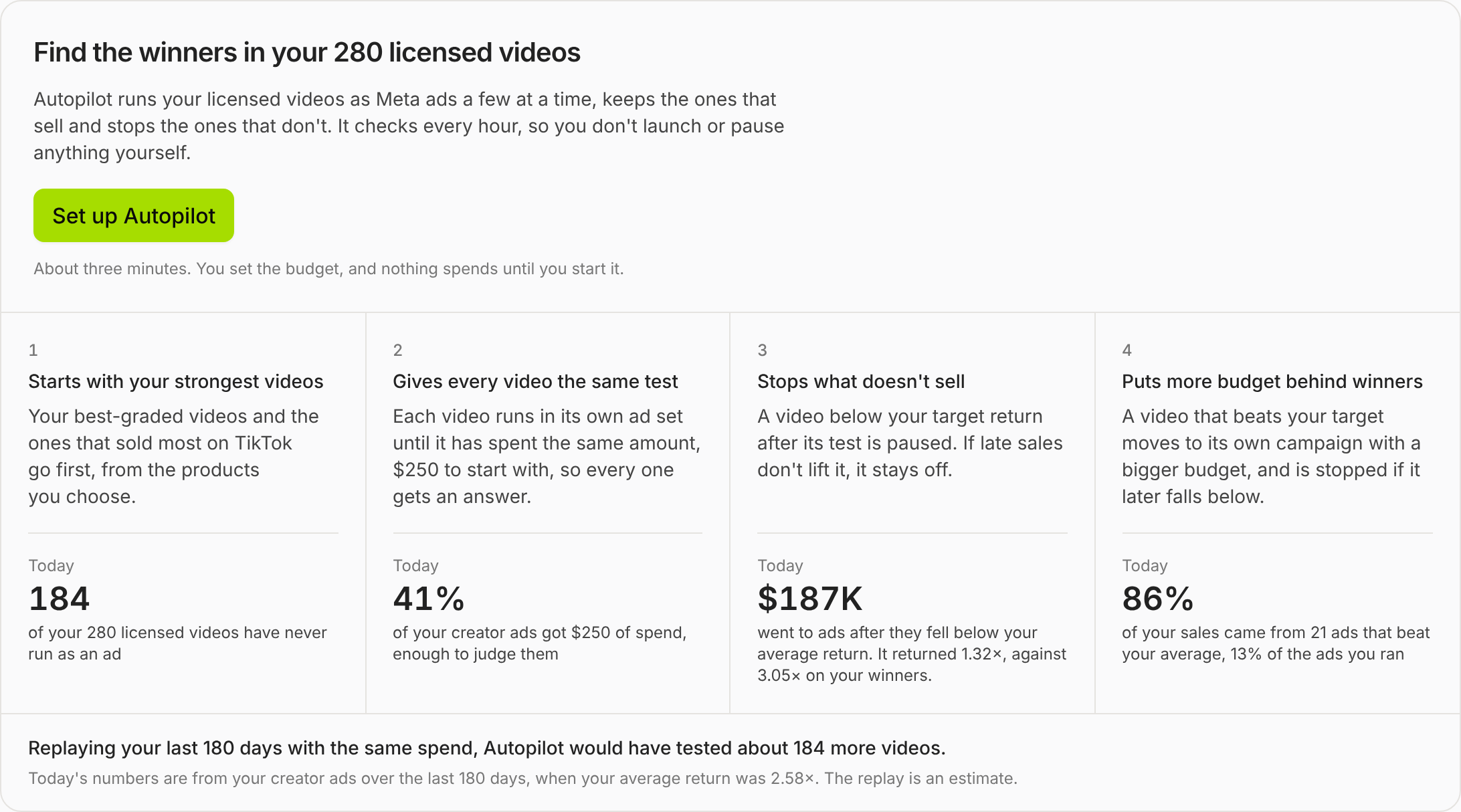
Before you set it up, the tab explains the four things Autopilot does: it starts with your strongest videos, gives every video the same test, stops what doesn't sell, and puts more budget behind winners. Under each step, Today shows what your own creator ads did, such as how many of your licensed videos have never run as an ad.
What you need
Meta Ads turned on, with your Meta account connected. Meta Ads is on Growth, Business, and Autopilot plans. See Meta Ads: setup, program, and payouts.
A Meta ad account and a Meta pixel. Autopilot creates its campaigns in that ad account and measures sales with the pixel. The pixel needs to send purchases with their value, or every video looks like it sold nothing.
Licensed videos. Autopilot tests videos you have permission to use in ads, from your Ads Program, usage rights, and other licenses in Licensed Content. With none yet, the tab offers Get licensed videos, which opens your Ads Program.
An ad account billed in a currency with cents. Autopilot can't run in an ad account billed in Chilean pesos, Colombian pesos, Hungarian forints, Icelandic krónur, Japanese yen, Korean won, Paraguayan guaraníes, New Taiwan dollars, or Vietnamese đồng.
Meta charges your ad account for the ads, as with any other ads you run.
Set up Autopilot
Click Set up Autopilot. Setup takes about three minutes, and each step starts with an answer Euka prepared for you, so you can often just click Looks good. Nothing spends until you start it, and Finish later closes setup without starting anything.
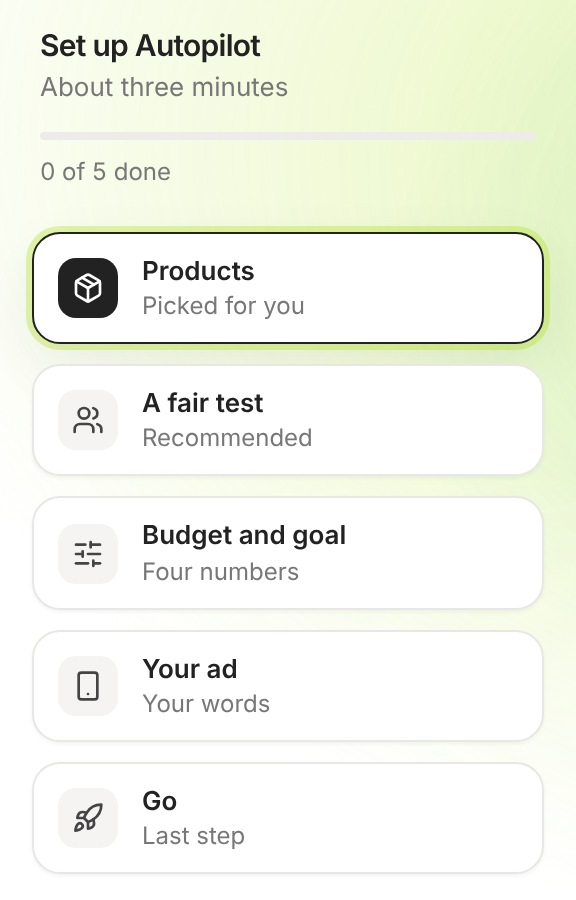
Ad account. You only see this step when Euka needs an answer: you have more than one ad account, your site isn't saved, or the ad account doesn't have exactly one pixel. Choose the Ad account, enter Your site (each ad opens a product's page on it), and pick the Meta pixel. You can't change the ad account after setup.
Products. Euka matches your videos to the product pages on your site and ticks up to 8 products that have at least 5 videos and a page, most videos first. Each row shows how many videos the product has and how many are graded A or B. If Euka can't find a product's page, paste its link. Show all lists products with fewer videos. Autopilot only tests videos of the products you tick.
A fair test. People who already buy from you buy again easily, which makes a video look better than it is. This step keeps the test fair:
Show the ads in: the country where the ads run.
Leave out people who bought in the last 180 days: built from your Meta pixel, and Meta keeps the list up to date. Meta asks you to accept its customer list terms once first. Open Meta takes you there, then click Check again. You can also click Skip for now: the setting stays on, and Autopilot leaves past buyers out on its next run after you accept the terms.
Also leave out your customer lists: customer lists in your Meta account, which cover buyers from before those 180 days. Choose lists picks them, up to 20.
Count a sale when someone: Clicks the ad (they clicked and bought within 7 days), Clicks or watches 10 seconds (the default, so people who only scrolled past don't count), or Clicks or sees it (people who only saw the ad and bought within a day count too).
Budget and goal. Four numbers in one sentence: spend this much a day testing videos, this much on each video before its verdict, a video wins at this return on ad spend (ROAS: sales divided by ad spend), and winners share this much a day.
Setting | Starts at |
|---|---|
Daily testing budget | $150 a day. Each video tests in its own ad set at $50 a day, so you need at least $50. |
Spend before a verdict | $250 per video, and at least $50. |
Target return | Your Meta ads' ROAS over the last 90 days, never below 1.0×. Without enough history, 1.5×, about what ads from Euka videos return across brands. |
Winners' daily budget | $50 a day, shared by every winner. |
Below the sentence, Euka shows what your numbers add up to: how many videos judged a month, how many videos in test at a time, and the most testing can spend in a month.
Your ad. Write the Text above the video and an optional Headline, with a preview of how the ad looks. Euka fills these in from your saved ad copy if you have some. You can give up to 5 of each for Meta to try. Leave Show the creator's name on the ad on to run partnership ads, with the creator's name next to yours, for creators who allowed it. Other creators' videos run as normal ads from your brand.
Go. Euka sums up what happens next: your first ads go live within the hour, one video each, and the first verdicts come in a few days later (about 5 days with the suggested budget). Click Start Autopilot, or Try a dry run first. A dry run records what Autopilot would do and spends nothing. To go live after a dry run, open Settings and click Start Autopilot on the last step.
Which videos it tests
Autopilot tests videos it hasn't run before, in this order:
Videos licensed in the last 30 days, then older ones once those run out.
Within each, the best Ad potential grade first: A, then B, then C, then videos with no grade, then D.
Then the videos that sold most on TikTok Shop, then the newest.
Euka grades your videos licensed in the last 30 days. When you have fewer than 20 of those left to test, it grades your older videos too, because Autopilot moves on to them next.
It skips:
videos of products you didn't tick;
videos flagged for Personal info, Wrong product, Competitor product, a broken Brand rule, or Slideshow or stock footage;
uploads waiting for your review or that you rejected, and licenses that ended;
videos already in one of your own Meta ads, since two ads with the same video compete in the same auctions and split the credit for sales.
How it judges and scales
Every video gets the same test: its own ad set, running until it has spent your verdict amount. Then:
At or above your target: it's a winner. Autopilot copies the ad into its scaling campaign, where winners share your winners' budget, and pauses the test ad.
Between half your target and your target: it gets more time, running up to twice the verdict amount. If it's still short of your target, it's handled like the next case.
Below that: it's paused while late sales come in, since Meta can credit a sale up to 7 days after a click. If late sales lift it to your target, it becomes a winner. If not, 3 days after it last spent, it's stopped and stays off.
A winner is stopped too if it's below your target once it has spent twice your verdict amount.
Autopilot's campaigns in Meta Ads Manager start with "Euka Autopilot": one for testing and one for scaling winners.
Built-in spending limits
Each Autopilot campaign has a spending limit in Meta of about a month of its daily budget, which Autopilot raises as it's used. If a day's spend across Autopilot's campaigns ever goes more than 50% over your testing and winners' budgets combined, Autopilot pauses both campaigns and turns itself off. The tab says why. Turn it back on to start again with new campaigns.
While it runs
The top of the tab shows Autopilot's status (Live, Dry run, or Off) and when it last ran, with these buttons:
Settings reopens the setup steps on your saved choices. While Autopilot is live, the steps end on Your ad, with Save changes.
Pause pauses Autopilot's campaigns in Meta. Resume switches them back on, in the mode Autopilot was in.
Run now runs Autopilot right away instead of waiting for the next hourly run. It's available while Autopilot is on.
Under the buttons, a row sums up your settings, such as "New customers in US", "$150 a day", and "1.5× to win". Below that:
Untested, Testing, Settling, Winners, and Stopped count your videos at each stage. Settling means paused while late sales come in.
Videos lists every video Autopilot ran, with its state, spend, and ROAS. States are Launching, Testing, Settling, Winner, Stopped, and Failed (Meta rejected the ad). Hover a state to see why, for example "Hit target at test budget".
Details lists Autopilot's ad sets and every change it made, newest first.
If a run fails, the tab shows "Last run failed" with the reason, and Autopilot tries again every hour. If past buyers aren't left out yet, it shows "Past buyers still see these ads" with Open Meta, so you can accept Meta's customer list terms.
The Autopilot suggestion
When you have a Meta ad account and haven't set up Autopilot, Euka suggests it once you have at least 5 videos licensed in the last 30 days that are graded A or B and have never run as an ad. A section above your Meta Ads tabs shows how many there are, with a few of them, and a slimmer one appears in Ads > Licensed Content. Test them with Autopilot opens the Autopilot tab. No thanks hides it for good, for you on that brand.
FAQ
Does Autopilot spend anything before I start it? No. Setting it up, saving settings, and a dry run spend nothing. Spending starts when you click Start Autopilot.
Can I change the budget after it starts? Yes. Open Settings, change the numbers, and click Save changes.
Why did a video get stopped so soon? Hover its state in Videos to see its ROAS and spend when it was judged. Check that your pixel sends purchases with a value: without them, every video reads as below target.
If something looks wrong, contact us at support@euka.ai.