NEW Retainers (Beta)
Last updated: October 7, 2026
Availability
The new, upgraded Retainer feature is in beta and switched on for a small group of accounts while we test it. If you would like access, contact your Euka point-of-contact to request.
What is the new Retainer feature?
We have upgraded our Retainer feature to match how you hire creators on a fixed package of videos for a fixed price, then allow you track delivery and payment in one place. One setup covers the whole collaboration, from the offer through to the payout.
You decide how many videos are in a package, what it pays, which products it covers, and the window the work is due in. Creators accept your terms or counter on price. Euka handles the money, the tracking, and the paperwork around it.
Coming from the previous Retainer feature?
If you have run retainers in Euka before, this is the same idea with everything that used to sit around it brought into one flow. Instead of setting a price per video and re-offering each period, you agree one package at one price. Creators can counter you in Euka rather than in a DM. Usage rights are part of the package, so you are not requesting them per video afterwards. Your contract is filled in from each creator’s own offer. And Euka carries the money through to the payout. Start a new retainer rather than moving an existing one across.
Why use it
Paid collaborations used to live in more than one place, which made them hard to compare and hard for creators to keep straight. Retainer Flex puts the whole deal in one flow:
- One setup, every creator. Set the package, the pay, the dates, the products, and the payment schedule once, and they prefill for everyone you invite. You can still adjust any of it per creator.
- Open it up or keep it closed. Invite specific creators by link, or open the retainer to the Euka Creator Community and approve applicants yourself.
- Negotiate in Euka. Creators accept or counter inside the product, so the deal does not live in a DM thread.
- Usage rights up front. Include rights in the package, and creators are told before they apply, so the price they give you already covers it.
- Pay on the schedule that fits. Hold the money with Euka until delivery, or pay once the work lands.
Where to find Retainer Flex
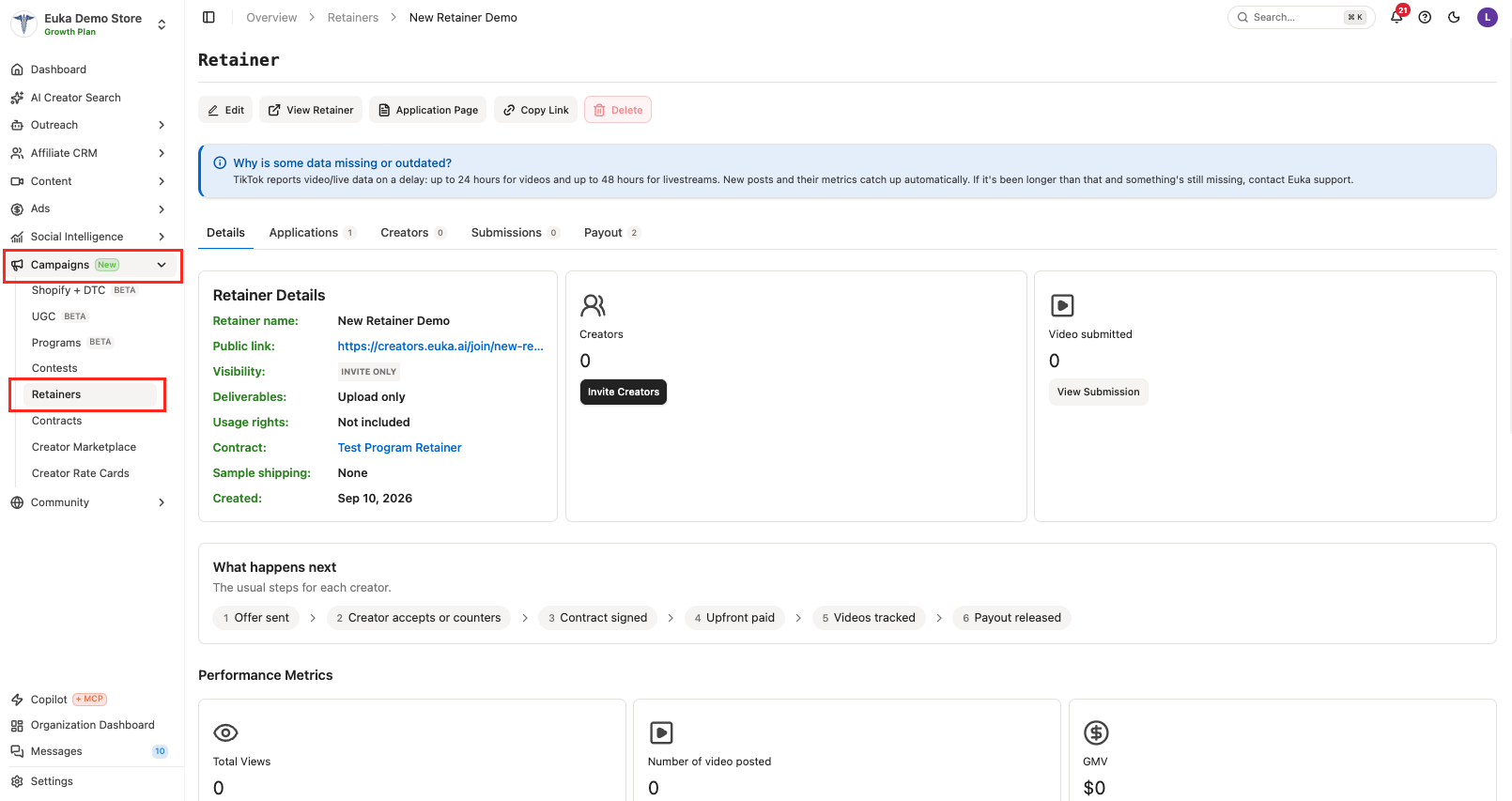
In the left sidebar, open Campaigns and then Retainers. To start a new one, click New Retainer.
How a retainer works, start to finish
| Stage | What happens |
|---|---|
| Offer | You build the package and either invite creators or open it for applications. |
| Negotiation | The creator accepts your package or counters on price. You can also talk it through in Euka Chat. |
| Contract | Both sides agree the terms, and the collaboration is locked in. Euka fills your contract template with the video count and package price from that creator’s offer. |
| Content | The creator delivers, in whichever way you chose under Deliverables. If you chose Review, then post, the creator sends each approved video to TikTok from Euka, then finishes posting it in the TikTok app. |
| Payment | The creator is paid on the schedule you set, once their videos count as delivered. |
Create a retainer
Setup runs across four steps, and you can move back and forth between them before anything goes out.
Step 1: General
Everything on this step applies to the whole retainer.
Creator Selection
- Invite Only. You invite creators, and they accept through the link you send.
- Open Application. Your retainer is open to the 70,000+ creators in the Euka Creator Community, plus a link you can share anywhere. You approve who gets in.
Package & Pay
Set how many videos are in a package, and the pay applicants see. Max is what they are shown, and Min is optional if you want to give a range. Euka shows creators a plain summary of it, for example "Up to $500 · 1 video". Tick Cap total creator spend if you want a ceiling on the retainer as a whole.
Deliverables
What a creator has to hand in for a video to count toward their package:
- Post to TikTok. Creators post inside the tracking window, and videos count once TikTok Shop attributes them to your store.
- Review, then post. Creators upload each video for your approval before posting it, and you can request revisions. Once you approve a draft, the creator taps Send to TikTok on it, and the approved video goes straight into their TikTok inbox so they can finish posting.
- Upload only. Creators deliver the video files for your approval. Nothing is posted, and no TikTok connection is required. Use this when you want footage for your own ads or channels.
Usage Rights
- Usage rights included. Once a creator delivers the package, you can use every counted video in ads and on your own channels, with no end date. Creators are told this before they apply, counter, and accept, so their price covers it.
- No usage rights. Creators keep their videos. You can still request usage rights per video from Content.
Notifications
The contact name and email that creator activity on this retainer goes to.
Creator defaults
Everything below this point is prefilled for every creator you invite, and you can adjust it per creator on the next step.
- Tracking Window. The start and end dates the work is due in.
- Products. The products this retainer tracks against. Leave it empty and the review screen shows Every video for your store, which means the retainer is not limited to a product list.
- Payment Schedule. Choose Held by Euka until delivery, where you pay the upfront share once the creator accepts and signs anything you have required, and it becomes theirs when they deliver, or Pay after delivery, which is one charge once the creator delivers with nothing held in advance. Creators are told which one you picked.
- Held upfront (% of package price). Only appears on Held by Euka, and defaults to 100. Creators see the full package price held by Euka.
- Contract. Optional. Attach a contract template and Euka fills the video count and package price from each creator’s offer.
Before you send
Upfront payments come out of your Euka Balance, which is shown on this step with an Add funds button next to it. If the balance will not cover what you are holding, top it up before the retainer goes out.
Click Creator Search & Pricing to continue.
Step 2: Creator Search & Pricing
A note at the top of this step says it plainly: inviting creators is optional now, and you can invite them from the retainer page later. If you would rather get the retainer live first, click straight through.
To invite someone now, click + Invite Creator under Invite Creators to Retainer. Search by handle, and results come back with each creator’s handle and follower count. Click the plus next to anyone you want, then click Done.
Your step 1 defaults carry over to everyone you invite, and this is where you adjust the terms for an individual creator rather than the whole retainer.
Click Customization to continue.
Step 3: Customization
This step is the retainer as creators see it.
- Retainer name. Creators see this name, so use something they would recognize.
- Banner image. Shown at the top of the retainer page. 1680 x 945 (16:9), up to 20MB.
- Description & qualification. Your pitch, and who you are looking for.
- Creative brief. Attach a brief creators can read before they accept and throughout the retainer. Briefs made in the brief builder appear here once they are published.
- Discord community. Optional, and only shown if Discord is switched on for your account. You can require Discord before a creator can accept, auto-assign roles when they join, open a retainer channel to work in, and DM the creative brief on join.
- Disqualification rules. Optional. Pick from the same 8 presets contests use, or write your own, up to 10 rules and 200 characters each. Creators read them on the retainer page, under the creative brief, before they accept. You apply them yourself on a retainer: nothing is disqualified automatically.
- Require shipping address & phone number. Turn this on if you are shipping samples yourself. Creators have to provide both before they can accept.
Disqualification rules lock when you create the retainer
You cannot add, change, or remove them afterwards, so every creator on the retainer works under the same rules. A warning on the Review step says so before you create, and a retainer created with no rules stays that way. Open the retainer for editing and the rules are there to read but not to change.
Click Review and Create to continue.
Step 4: Review and Create
The last step lays everything out in three sections, General, Creator Search & Pricing, and Customization, each with an Edit link back to that step.
The General section is the one worth reading twice, because it restates your choices in plain language rather than as form fields:
- Tracking window, tracked products, and deliverable
- Payment schedule, spelled out in full, for example "100% upfront after acceptance and any required signing, held by Euka until delivery"
- Usage rights, contract, creator selection, package, budget, and your notification contact
When it all reads the way you meant it, click Create Retainer.
Share your retainer
There is one link to share, and it's the same page creators see in the Euka creator app at creators.euka.ai.
- Copy Link, at the top of the retainer, copies it. View Retainer next to it opens the same page, so you can read what creators read.
- On an Open Application retainer, a creator who isn't signed in can read the page: your banner, description, creative brief, disqualification rules, and pay. Apply takes them to sign in first, then brings them back.
- An Invite Only retainer shows nothing to someone who isn't signed in. They see Sign in to view this retainer, with "If the brand invited you, sign in with the account they invited so we can check your invitation." A creator who signs in without an invitation sees "This retainer is invite only".
- Application-page links you shared before still work, so you don't need to replace them.
Negotiating with a creator
A creator can accept your package as sent, or counter with a different price. Both happen inside Euka, so the history stays on the collaboration instead of in a message thread.
If a deal needs more back and forth than a counter-offer, talk it through in Euka Chat and come back to accept.
Reviewing content before it goes live
Whether you see videos before they are public depends on the deliverable you chose on step 1.
- Post to TikTok. No review. Creators post inside the window and the video counts once TikTok Shop attributes it to your store.
- Review, then post. Every video comes to you first. Approve it and the creator taps Send to TikTok, which drops the approved video into their TikTok inbox to finish posting, or request revisions and they upload again.
- Upload only. Every video comes to you for approval, and nothing is posted anywhere.
Only approved videos count
When you use Review, then post, only videos the creator sends through Send to TikTok count toward the retainer, one per approved draft. If the creator posts anything else, it shows as Not counted for both you and the creator, so you always know the video that went live is the one you approved.
Tip
Post to TikTok works well for creators you have worked with before. Review, then post is worth the extra step with new creators, or on a product where the claims have to be exact.
Watching what creators post
The retainer has five tabs: Details, Applications, Creators, Submissions, and Payout.
Submissions is every video in one place. Posted lists the TikTok Shop videos the retainer counted, whoever posted them, and they show up within an hour of TikTok Shop attributing them to your store. On a retainer that reviews drafts, a Drafts queue sits beside it.
- Click a video's thumbnail or its caption to watch it in Euka, including a video with no public link.
- Disqualify, to the right of Status, takes a video out of that creator's count. Pick one or two reasons from the list, and write your own when you pick Other.
- A disqualified video shows Undo in place of Disqualify, which puts it back in the count.
- Neither button shows once that creator's delivery is complete.
The Creators tab has the same thumbnails and the same Disqualify and Undo inside each creator's row, so you can work creator by creator instead.
The review window before payment
Once a creator's counted videos reach their package, you have 3 days to look through them before the collaboration moves to payment on its own.
- Upload only has no review window. Approving a video is final, so the approval that completes the package moves the creator straight to payment, and the Pay button appears on the Payout tab right away.
- Open the creator from the Creators tab and a line names the date: "Payment unlocks automatically on October 10, 2026 unless you disqualify a video first". Confirm delivery sits beside it, and moves them on now rather than waiting.
- We email your notification contact when the creator meets the target, and again 24 hours before the 3 days are up. Both say how many videos were delivered and when payment unlocks, and both have a Review videos button that opens the Creators tab. Upload only retainers skip both and get a payment-due email instead.
- Disqualifying a video takes the count back under the package and stops the clock. If the creator posts again and meets the target, the 3 days start again from that moment, and you are emailed again.
How payment works
You set the schedule on step 1, and it prefills for everyone you invite:
- Held by Euka until delivery. You pay the upfront share once the creator accepts and signs anything you have required. Euka holds it, and it becomes theirs when they deliver. The share defaults to 100% of the package price, and creators see the full amount as held.
- Pay after delivery. One charge once the creator delivers. Euka holds nothing in advance, and creators are told that up front.
Upfront payments come from your Euka Balance, so make sure it covers what you are holding before the retainer goes out.
When a video counts as delivered depends on your deliverable. On Post to TikTok it is posted in the window and attributed to your store. On Review, then post and Upload only, it is once you have approved it.
Frequently Asked Questions
- What is the difference between Invite Only and Open Application? Invite Only means the retainer is only reachable by the link you send to the creators you picked. Open Application puts it in front of the 70,000+ creators in the Euka Creator Community and gives you a link to share, and you approve applicants.
- Do creators have to post on TikTok? No. Choose Upload only and creators deliver the video files for your approval. Nothing is posted and no TikTok connection is required.
- Can I set up a retainer before I know which creators I want? Yes. Inviting creators is optional during setup, so you can create the retainer and invite people from the retainer page afterwards.
- Can I change the terms for one creator? Yes. Everything under Creator defaults is prefilled for everyone, and you adjust it per creator on the Creator Search & Pricing step.
- Where does the upfront money come from? Your Euka Balance. It is shown on the General step with an Add funds button, so you can top it up before you send.
- Do I have to pay anything before a creator delivers? Only if you choose Held by Euka until delivery, and even then the money is held rather than released. Choose Pay after delivery and there is one charge once the work lands.
- What happens if a creator counters my offer? You will be notified, and you can accept the counter, hold at your number, or talk it through in Euka Chat. Nothing is locked in until both sides agree.
- Can I change the disqualification rules after I create a retainer? No. They are fixed at creation, so every creator on the retainer works under the same rules, and a retainer created without rules cannot be given any. Check them on the Review step before you click Create Retainer. The retainer's Retainer Details lists what you set, or None. If the rules have to change, create a new retainer.
- If I do not include usage rights, can I get them later? Yes. You can still request usage rights per video from Content. Including them in the package is usually simpler, because creators price it in rather than being asked after the fact.
- How do I share a retainer with creators? Click Copy Link at the top of the retainer. That is the only link you need, and it opens the same page creators see in the Euka creator app. On an Open Application retainer it works for creators who aren't signed in yet.
- Can I still disqualify a video after a creator hits their target? Yes, for 3 days. After that the collaboration moves to payment on its own, so act while the "Payment unlocks automatically" line is still showing. Disqualifying inside those 3 days takes the count back under the package and stops the clock.
- Why does a video show as Not counted? If the retainer uses Review, then post, a video only counts when the creator sends the approved draft to TikTok from Euka. A video posted any other way, even the same content, shows as Not counted. Ask the creator to open the approved draft in Euka and tap Send to TikTok.