Contests
Last updated: October 7, 2026
A contest rewards creators for promoting your products between set dates. They can win for the number of videos they post, the sales (GMV) they drive, their place on a leaderboard, or their views.
Why use it
You want creators to post about your products, and you want to reward the ones who deliver. It's hard to count every creator's posts and sales by hand and work out who won. You set up a contest in Euka, creators join it in the Euka creator app, and we track their TikTok posts and work out the winners.
Where to find it
Campaigns > Contests lists your contests. Open one to see its tabs: Details, Participants, Submissions, Payouts, and Notifications.
Who can use it
Contests are on the Growth, Business, and Autopilot plans, and your TikTok Shop has to be connected and verified. See Plans and limits and Connect your TikTok Shop.
Contest types
Each contest is one of four types.
| Type | Creators win by | Rewards |
|---|---|---|
| Posting Challenge | Posting a number of videos. A tier can also require a minimum GMV: the creator's total, not per video. | Cash or a custom reward, per tier |
| GMV Challenge | Reaching a GMV threshold. A tier can also require a minimum number of posts and, when LIVEs count, a minimum number of hours LIVE. | Cash or a custom reward, per tier |
| Leaderboard Contest | Ranking by GMV or by number of posts. A rank can have several winners, a minimum GMV, and a minimum number of posts. | Cash or a custom reward, per rank |
| CPM Contest | Views, at one rate per 1,000 views (CPM). You can cap the views paid per video and the payout per creator, and require a minimum number of views or minimum GMV per video. | Cash only |
- A creator wins only the highest tier they qualify for. Tiers don't add up.
- Only Posting Challenges can repeat: Weekly, Bi-weekly, or Monthly, for 1 to 52 periods. Each period is scored and paid on its own. The other types run once, between a start and an end date.
- Content Type can be Video Only, Video + Livestream, or Livestream Only. Each LIVE session counts as one post. CPM Contests are video only.
- Products can be All products from store, or up to 25 products you choose. Livestream Only always uses all products, and LIVE sales always count across all your products.
- We don't pay or ship custom rewards, such as free product or a trip. You deliver them yourself. When a contest has one, Payouts adds a Shipping Address column.
How to create a contest
- In Campaigns > Contests, click New contest.
- On General, choose the type, the Content Type, and the Products. For a Posting Challenge, also set the Frequency (One-time Contest or Recurring Contest) and the Contest timezone.
- On Videos and Prizes, set the tiers, ranks, or CPM rate. To cap the total, tick Set a max budget.
- On Customization, add the Contest Name, a Banner Image (required), and at least one disqualification rule. You can also set a Custom Link, a description, a creative brief, and who can join. For types other than the Posting Challenge, you set the dates and Contest timezone here.
- On Payments, choose Pay via Euka or Pay outside Euka, the card or bank account you'll pay with (Settlement method), and the payout due date: 3, 7, 14, or 30 days after the contest ends. Creators see how and when you'll pay on the contest page before they join.
- Check everything on Review and publish, and click Create. The confirmation gives you the contest's link, with shortcuts to start an agent or an email campaign that shares it.
See Outreach agents and Email campaigns.
How to make a contest public
Every new contest is private, and creators join it from its link. To list it for every creator in the Euka creator app, make it public. There's no fee for it.
- Open the contest and click Make Public.
- Read the confirmation, Make this contest public?, which tells you every Euka creator will be able to see and join. If joining is limited today, it also warns This removes the join restriction.
- Tick I agree to the contest terms and policies, and click Make Public.
The contest goes public straight away, and a public contest can't be made private again.
While it runs
Share makes a separate link for each place you post the contest. It shows the clicks, joins, and videos each link brings.
Creators see an Official Rules link on your contest at all times, before and after they join. It lists that contest's sponsor, eligibility, dates, prizes, payout date, and disqualification rules, along with the contest details you wrote. Euka is the sponsor of every contest, and you are the prize provider: you set and fund the prizes, and they're paid through Euka or by you, as you chose under Payments.
Publish Announcement shows an Info, Warning, or Success message on the contest page creators see. A new announcement replaces the last one.
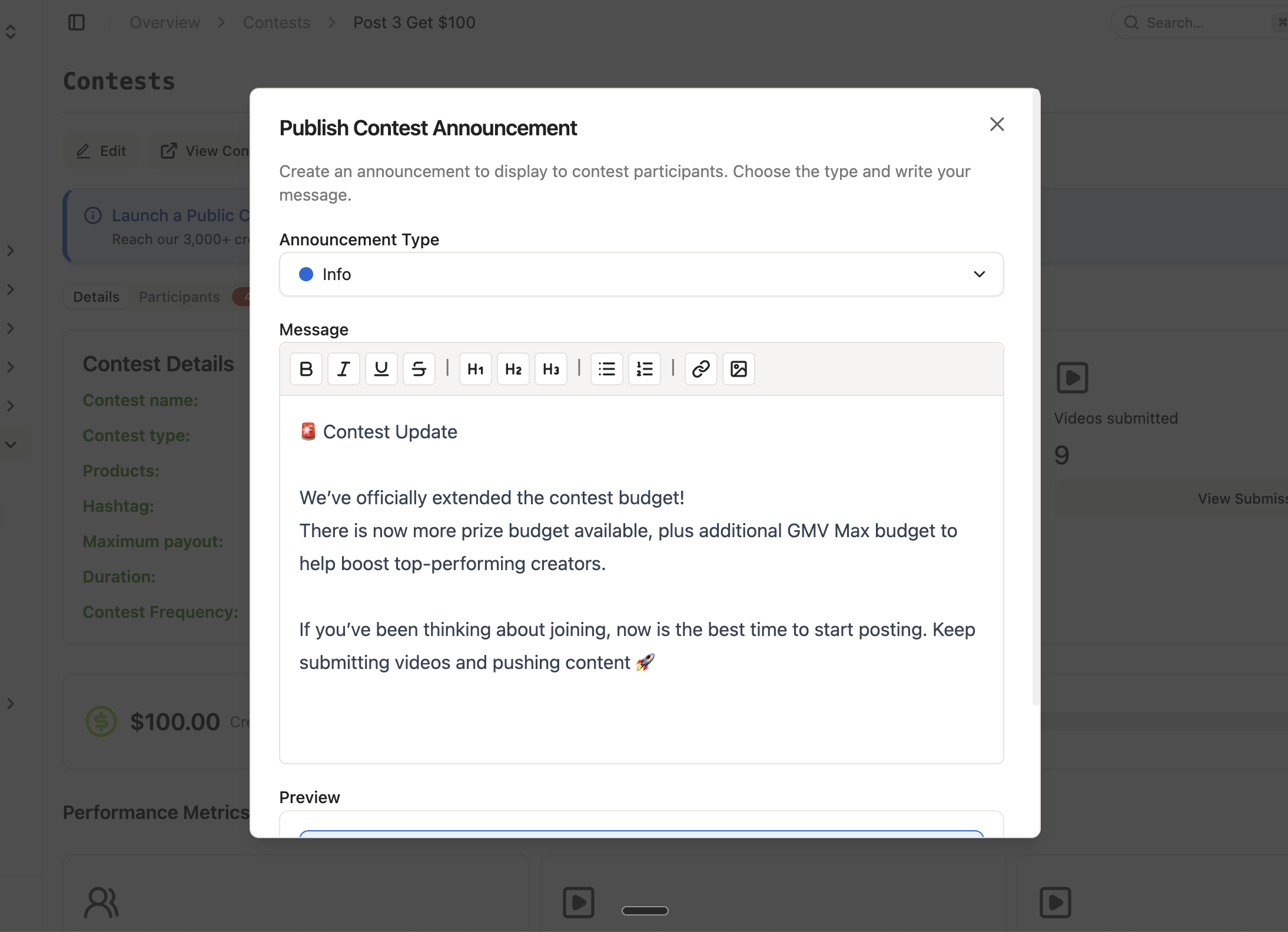
The screenshot shows the Publish Contest Announcement window, where you pick the Announcement Type, write the Message, and check the Preview below it.
The Notifications tab messages creators who joined, in the Euka creator app and by email, between 9 am and 8 pm in the contest's time zone. You can turn on any of these:
- Welcome message: goes out shortly after a creator joins.
- Haven't-posted nudge: goes out after 1 to 30 days without a qualifying post (3 by default). It's canceled if they post first.
- Ending soon reminder: goes out 1 to 14 days before the end (3 by default), to creators who haven't posted, who have, or everyone.
Each rule sends once per creator, and only to creators who join after you turn it on. Automated messages stop at 3 per creator per contest, and each can be up to 1,800 characters. Message participants sends a one-off message to everyone, or only to creators who have or haven't posted.
An email subject is optional on any of these. Leave it empty and we use the contest's name as the subject.
Creators can turn these messages off in the Euka creator app, under Profile > Notifications, so a few of your participants won't get them. A notice that you disqualified one of their videos always reaches them.
Export Data downloads the participants, submissions, or payouts.
What a LIVE sold
When LIVEs count, each LIVE row on Submissions shows in its Product column the product with the largest share of that LIVE's sales, that share, and +N more. Hover it for every product in the LIVE, with the share and the units ordered for each. Export Data lists them all in the same column, for example "Diffuser Oil 37% · Mop Soap 33%".
- The shares come from TikTok's order data for the LIVE. They include orders that were later refunded or canceled, just as the LIVE's sales do, and leave out orders still waiting for payment.
- They are there to show you what sold. Ranking, tiers, and payouts still use the LIVE's sales (GMV), not the breakdown.
- We read a LIVE's orders twice a day, so orders placed in the last hours before the results are final can be missing from the breakdown. The LIVE's own sales figure isn't affected.
- A LIVE we have no order data for shows a dash.
How to pay winners
Results are final 24 hours after the contest ends, or for a recurring Posting Challenge, 24 hours after each period ends. Until then, Payouts marks the winners as preliminary.
Payment is due the number of days you chose after the contest ends. Payouts shows the date as Payment deadline, and creators see it too.
- On Payouts, click Pay Out Creators.
- Tick the winners.
- Choose Pay via Euka or Pay Outside Euka.
For payment methods, fees, and what happens when a payout is overdue, see Paying creators. Creators withdraw what you pay through Euka in the Euka creator app. See Earnings and withdrawals.
Rules and limits
Who can join
- While a contest is private, Who can join sets who gets in: Anyone with the link, creators who type in a Verification code (4 to 32 characters), or an Invite list, so only creators on the lists you pick can join. You can add a creator to the invite list by TikTok handle. Making the contest public switches this off.
- With Exclude creators from other contests, creators who joined any contest you pick can't join this one, whether it's public or private.
- Creators whose TikTok region is known and isn't your Shop's can't join.
- A creator on one of your retainers with Contest Exclusivity on can't join a contest that overlaps their retainer period. See Retainers.
- Require shipping address & phone number makes creators give both before they join. Both are in the payouts export.
- A Brand Contract URL, under Creative brief, links your own terms. Creators must accept them before they join.
What counts
A video counts when a creator who joined posts it between the start and end dates, and it tags one of your products (one of the contest's products, if you chose specific ones). When LIVEs count, so does each LIVE session in those dates. Disqualified videos don't count.
The dates start and end at midnight in the Contest timezone, which is US Pacific time unless you change it.
Which TikTok account a creator competes as
A creator competes as one TikTok account, and it's fixed when they join.
- A creator with two or more connected TikTok accounts picks one first, under Choose your TikTok account, before they accept your terms. Their main account is marked Primary and offered first.
- An account that needs reconnecting is listed but can't be picked, with the reason beside it, such as "Reconnect to use".
- A creator with one connected account doesn't choose. That account competes.
- The choice can't be changed afterward. The creator app tells them so before they confirm, and their contest page then shows Joined as @handle.
- Only the videos and LIVEs that account posts count. Participants, Submissions, Payouts, and your contest messages all use it.
- A creator can compete as a different account in a different contest.
Disqualification rules
A contest needs at least one rule and can have up to 10. Creators see them throughout the contest. Pick from 8 presets, or add your own:
- Spam or Mass-Produced Content
- AI-Generated Content (can be automatic)
- Required Product Not Adequately Demonstrated
- Faceless Content (can be automatic)
- Off-Brand or Misleading Claims (can be automatic once you describe what counts as a misleading claim)
- Fraudulent Purchase or Return Behavior
- Creator-Initiated Boosting or Promotion (can be automatic)
- Not Long-Form Content (can be automatic; you set the minimum length, 30 seconds by default)
Switch one of those five from Manual to Auto, and we disqualify the videos that break it. You can check these decisions: a banner on the contest lists them (Review), and you can Undo each one until the results are final.
You apply every other rule yourself, giving one or two reasons. You can disqualify videos on the contest page until the results are final, and requalify them until then too. You can also disqualify a creator on Payouts, but that can't be undone.
Usage rights
A contest doesn't give you the right to use a creator's video in your own ads. There's nothing to set up for it, and the contest terms creators accept say nothing about it. Videos you licensed another way are unaffected.
To use a contest video in an ad, ask the creator for usage rights from Content > Videos, or run a Meta Ads program. See Usage rights.
Max budget
Set a max budget caps what a contest pays in total. Leaderboard Contests don't have it.
- We check the prizes earned against the budget every 4 hours.
- When they reach it, we fund the prizes from the largest down, as far as the budget goes, and end the contest that day. Prizes that don't fit aren't paid.
- Raising the budget afterward doesn't reopen the contest.
Change, delete, or end a contest
- A private contest can be edited at any time. A public contest can be edited until its start day begins in its time zone.
- Once a contest has started, you can't change its time zone.
- You can't change the dates of a GMV Challenge, Leaderboard Contest, or CPM Contest after you create it.
- You can delete a contest only while it has no participants.
- You can't end or pause a contest yourself. It ends on its end date, or early when it reaches its max budget. If you need an exception, contact us at support@euka.ai. Pausing or archiving a contest isn't a way to stop it, and neither is deleting it.
- Once a contest's last day is over in its time zone, we stop the outreach campaigns that its confirmation screen started, so they don't keep inviting creators to a contest that's finished. We go by the name we gave them, which is your contest's name, then "-Outreach-" or "-Incentive-", then the start date, as in "Summer Push-Outreach-20261001". We check once a day. A campaign you renamed keeps running, so stop that one yourself in Outreach > Outreach Agents.
What we don't control
Contest numbers come from TikTok, which reports video data up to 24 hours late and LIVE data up to 48 hours late (as of September 2026). New posts and their numbers catch up on their own.
When something goes wrong
- TikTok Shop Connection Required: connect your TikTok Shop and finish verifying it, then try again.
- Run a contest today: contests need Growth or higher. Change your plan in Settings > Brand > Billing.
- New contest is grayed out, "Locked — … in creator payouts is overdue": a contest payout is overdue. Pay the overdue payouts, and the lock lifts. See Paying creators.
- Edit is grayed out, "Public contests cannot be edited after started": the contest is public and has started. Contact us at support@euka.ai if something has to change.
- Delete is grayed out, "Contest cannot be deleted if there are participants": a creator has already joined.
- "Contest with provided URL exists, please provide another one": choose a different Custom Link.
- A creator can't join: the Euka creator app tells them why, for example "This contest is invite-only. Ask the brand to add you to their invite list."
- A creator sees "That TikTok account is no longer available. Refresh and pick again.": the account they chose can't be used now. The app reloads their accounts so they can pick again.
FAQs
Can a GMV Challenge or Leaderboard Contest repeat every month?
No. Only Posting Challenges repeat. The other types run once, between two dates.
Can I make a public contest private again?
No, making a contest public is permanent. Making a contest public is free.
Why can't I edit my contest?
It's public, and its start day has begun. A private contest stays editable. For a public one that's running, contact us at support@euka.ai.
Can I stop a contest early?
You can't stop it yourself. A max budget ends it automatically once prizes reach it. Otherwise, contact us at support@euka.ai.
Does Euka disqualify videos for me?
We do, but only under the rules you switch to Auto. You apply the rest yourself, and you can undo an automatic decision until the results are final.
If a creator reaches several tiers, do they win all of them?
No. They win the highest tier they qualify for.
A creator has two TikTok accounts. Which one competes?
The one they pick when they join. They see their connected accounts and choose, and only that account's posts count from then on. Neither of you can change it afterward, so if a creator joined with the wrong account, contact us at support@euka.ai.