Connect your TikTok Shop
Last updated: October 3, 2026
Euka connects to your TikTok Shop through an affiliate manager account. You add an email address we give you to your Shop as a user with TikTok's Affiliate Manager role, and we use it to send and monitor outreach for you.
Why use it
Your outreach agents can't reach creators from your Shop until it's connected. The last step, installing the Euka TikTok Shop app, adds the features that work through TikTok's API, the official way apps connect to TikTok Shop. With it, you can invite creators you choose, approve the free samples they request, send offers to use their videos in your own ads, and let Auto Responder answer their messages.
Where to find it
- Connect TikTok Shop, at the top of the app, opens the Setup Affiliate Manager window. The button shows until your Shop is connected. During a free trial, the Dashboard has the same button.
- Outreach > Outreach Agents opens the window by itself while your Shop isn't connected.
- To connect another Shop, first add it as a brand with Add brand in the brand switcher. Euka then opens Outreach Agents for the new brand, with the window open. See Brands, organizations, and licenses.
Who can use it
Every plan, including the free trial, can connect a Shop and install the app. Of the features the app adds, Auto Responder needs Growth, Business, or Autopilot. See Plans and limits.
How to connect your Shop
- Open the Setup Affiliate Manager window. It shows the email address to add.
- Copy the email with the copy button beside it.
- Sign in to TikTok Shop Seller Center, where you manage your Shop, with your Shop's main account.
- In Seller Center (as of July 2026), go to User management and click Add User. TikTok Shop connection problems shows how to reach User management.
- Enter the email.
- Under Managed shops, turn on your Shop.
- Under Role, choose Affiliate Manager.
- Click Send invite. TikTok sends its invitation to that address.
- Back in Euka, click I've added the affiliate manager. The badge next to Account Setup changes from Not verified to Verifying.
- Wait for Verified. The window says this takes 1–2 minutes.
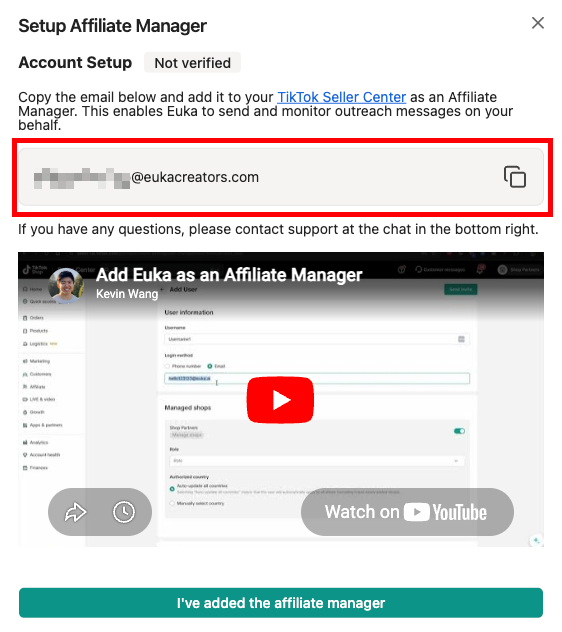
The screenshot shows the Setup Affiliate Manager window before verification: the Not verified badge, the email to copy, a video on adding it in Seller Center, and the I've added the affiliate manager button.
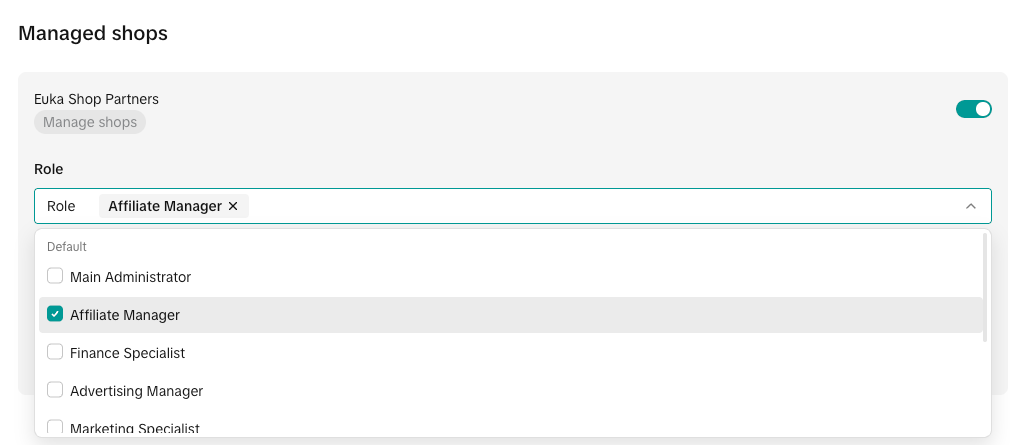
The screenshot shows the Role list in Seller Center (as of July 2026), with Affiliate Manager ticked. With any other role, such as Marketing Specialist, verification doesn't finish.
How to use an existing affiliate manager account
Instead of adding the email we give you, you can let us sign in with an affiliate manager account your Shop already has.
- Set up email forwarding on that account's mailbox to dev@euka.ai, so we get the verification codes TikTok sends when we sign in. With Gmail, forwarding starts only once the receiving address confirms it (Google's rule, as of September 2026), so contact us at support@euka.ai after you add it.
- With the brand selected in the brand switcher, go to Settings > Brand > Brand Details and click Set login under Affiliate manager login. Brand owners and admins can set it while the store isn't verified yet.
- Enter the account's Email and Password.
- Click Save credentials. The store shows as Verified as soon as you save, before we've signed in.
If your agents don't start sending, check the email, the password, and the forwarding, then contact us at support@euka.ai.
How to install the Euka TikTok Shop app
Once your Shop shows Verified, the window's last section is Final Step: Install Euka TikTok Shop App (Recommended).
- In the browser you use for Euka, sign in to Seller Center with the Shop's admin (main) account.
- Click Install Euka TikTok Shop App. TikTok's authorization page opens in a new tab.
- On TikTok's page, choose your country and where your seller account is based. This step and the next two are TikTok's, as of September 2026.
- Install Euka, or renew it if it's already installed.
- Accept the permissions it asks for. Euka shows "Successfully connected Euka to your store" with your Shop's name, and you can close the tab.
If you'd rather do it later, click Skip for now. These features need the app:
- Target collaboration invitations, which outreach agents send to creators you choose. In the markets where the app is available, TikTok accepts invitations only through it: without the app, agents that send invitations stay Running but send none. See Outreach agents.
- Auto Responder, which replies to creators' direct messages (DMs) for you. See Auto Responder.
- Approving sample requests (creators' requests for a free sample) in Euka, by hand or with Auto Review agents. See Sample requests.
- Sending usage rights offers, which ask a creator for permission to use their video in your own ads. See Usage rights.
- Email + Target Collaboration email campaigns. See Email campaigns.
- Delete Unaccepted Invites on Outreach Agents, which removes target collaboration invites creators haven't accepted.
The window also says the app makes your outreach messages faster and more reliable.
Rules and limits
- The email. We create the address, on tiktokshoppartner.us, euka.ai, or eukacreators.com, unless you choose Use a custom email instead of Auto-generate (default) when you add a brand. A custom address always ends in @tiktokshoppartner.us, and the name before it can use letters, numbers, dots, hyphens, underscores, plus signs, and percent signs. We don't send emails to this address.
- Verification looks for TikTok's invitation to that address, so click I've added the affiliate manager after you've sent the invite in Seller Center, not before.
- Until your Shop is verified, we ask you to connect it first when you create or start an outreach agent, or create a contest or a Creator Marketplace campaign.
- The app installs for Shops in 19 markets: the United States, Mexico, and Brazil; the United Kingdom, Ireland, France, Germany, Spain, Italy, the Netherlands, Belgium, Austria, Portugal, Poland, Czechia, Greece, and Hungary; and Japan and Indonesia. It also installs for cross-border Shops on TikTok Shop's global seller center. See Supported markets.
- The install link differs by market. Shops in the US and Mexico install one version of Euka's app, and Shops in the other markets another. The button in Euka opens the right one for your Shop, so start there rather than from a saved link.
What we don't control
Seller Center is TikTok's. TikTok decides who can add users to your Shop, what each role allows, and what its app authorization page asks (as of September 2026). If you don't have your Shop's main account, ask whoever does.
When something goes wrong
- Not verified again after Verifying: we found no TikTok invitation for that address. In Seller Center, check that the email matches exactly and has the Affiliate Manager role, then click I've added the affiliate manager again.
- Still Verifying after a few minutes: contact us at support@euka.ai, as the window says.
- "There was an error verifying … as an affiliate manager.": contact us at support@euka.ai.
- TikTok Shop API not available, "TikTok Shop API authorization is not yet available for the … region.": the app isn't available in your Shop's market. See Supported markets.
- "Failed to connect to TikTok Shop App": start again from the button in Euka, in a browser where you're signed in to Euka, and to Seller Center with the main account.
- TikTok Shop Connection Required: your Shop isn't verified yet. Click Connect Now to open the setup window.
- We can't log in to your TikTok Shop, after your Shop was connected: see TikTok Shop connection problems.
FAQs
Can I choose the affiliate manager email?
Yes, but only when you add a brand, and only on tiktokshoppartner.us. Choose Use a custom email and type the part before the @. Euka suggests your brand name, such as brandname@tiktokshoppartner.us.
Do I have to install the Euka TikTok Shop app?
Your Shop is connected once it shows Verified, but install the app too. In the markets where it's available, outreach agents can't send target collaboration invitations without it, and the other features listed above need it as well.
Who should install the app?
The person who installs it needs your Shop's admin (main) account in Seller Center, and must also be able to sign in to Euka with access to the brand. If a client holds that account, invite them to the brand first: see Team members and roles.
I installed Euka from TikTok Seller Center first. What now?
TikTok sends you to Euka to sign in. Then confirm the Shop: click Connect TikTok Shop, and pick the brand that owns it if you have several.
Do it within 24 hours, or Euka says This installation link has expired and you start again from Seller Center. You still add the affiliate manager as described above.