TikTok Shop connection problems
Last updated: October 3, 2026
We work in your TikTok Shop by signing in as the affiliate manager you added in Seller Center, where you manage your Shop. Some features also go through the Euka TikTok Shop app. This article covers a Shop that won't verify, the We can't log in to your TikTok Shop window, and authorizing the app again.
Where to find it
- The Setup Affiliate Manager window shows your Shop's status. Connect TikTok Shop, at the top of the app, opens it. It also opens by itself on Outreach > Outreach Agents until your Shop is verified.
- The We can't log in to your TikTok Shop window opens by itself, on any page, when we can't sign in to your Shop.
- TikTok Shop App Authorization Required appears on Outreach > Auto Responder, Affiliate CRM > Sample Requests, and Ads > Usage Rights while the app isn't authorized.
When your Shop won't verify
| Status | What it means | What to do |
|---|---|---|
| Not verified | We haven't confirmed the email is an affiliate manager in your Shop. It also comes back after Verifying when we found no TikTok invitation for it. | Check the user in Seller Center (below), then click I've added the affiliate manager. |
| Verifying | We're checking. The window says this takes 1–2 minutes. | Wait. If it's still verifying after that, contact us at support@euka.ai. |
| Verified | Your Shop is connected. | Install the Euka TikTok Shop app if you haven't yet. See Connect your TikTok Shop. |
If your Shop won't verify, find the user in Seller Center's User management (the next section shows how) and check that:
- Its email matches the one in the window exactly. Copy it with the copy button rather than typing it.
- Its role is Affiliate Manager. Another role, such as Marketing Specialist, doesn't work (TikTok's roles, as of September 2026).
- Its status is Active.
- Its language is English. We finish setting up the account for you, and can't when the account uses most other languages, so choose English as its User language when you add it (TikTok's setting, as of September 2026).
How to find your affiliate manager accounts in Seller Center
These are TikTok's menus, as they looked in the US Seller Center in July 2026. Seller Center in other markets may look different.
- Sign in to Seller Center for your Shop's market with the main account, the one that owns the Shop. If you don't have it, ask whoever does.
- Click your Shop's name at the top right, then Settings.
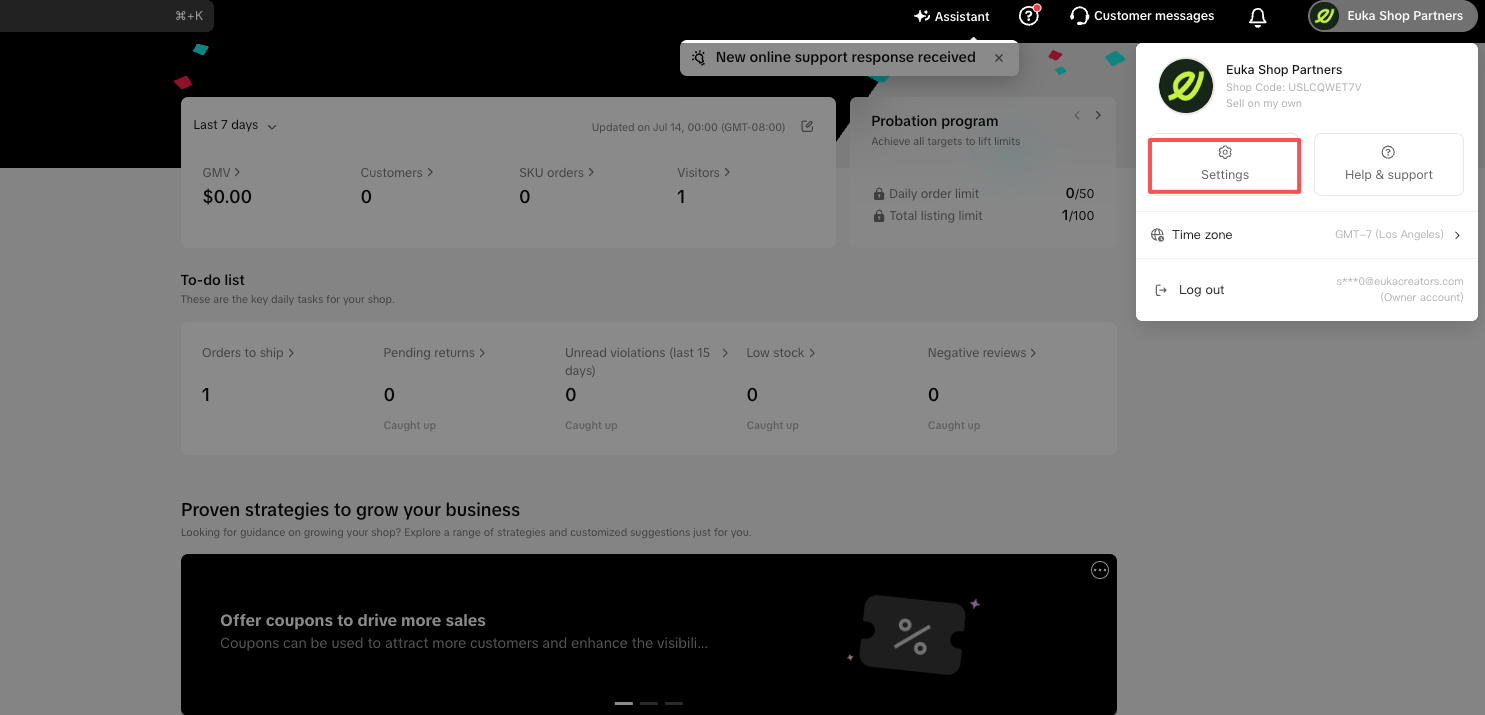
The screenshot shows the account menu in Seller Center, with Settings marked.
- Click Account settings.
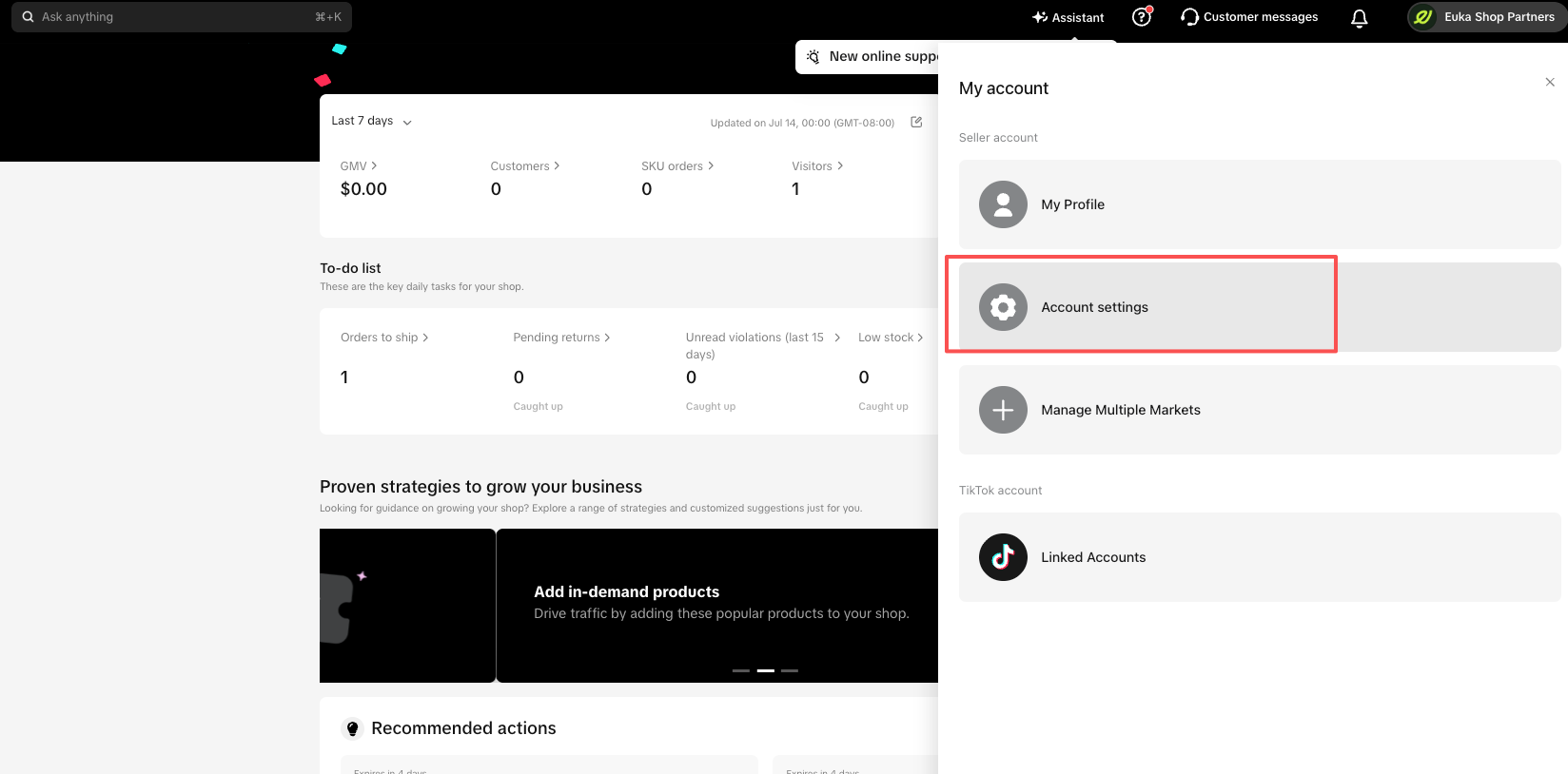
The screenshot shows the My account panel, with Account settings marked.
- Click User management.
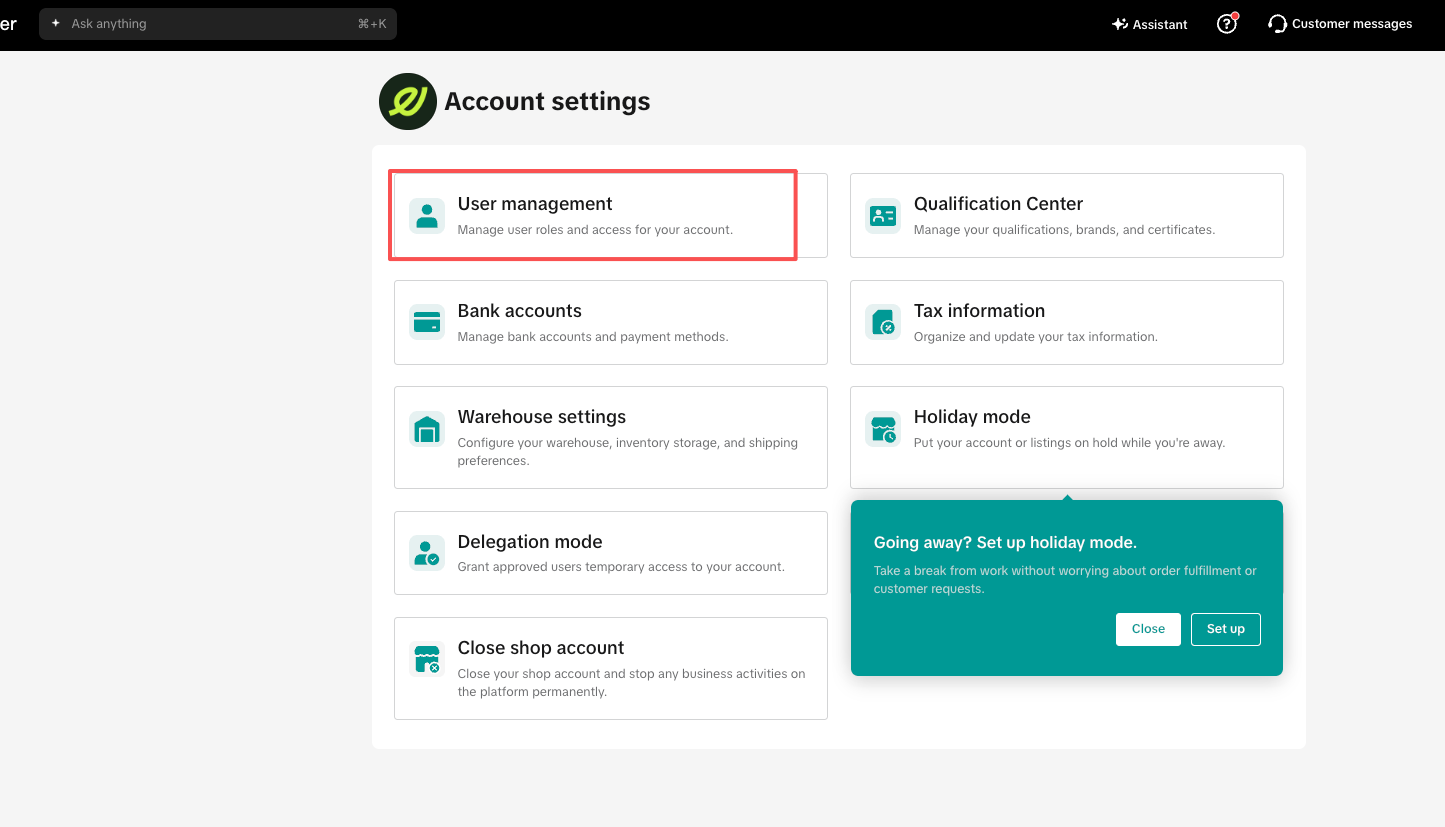
The screenshot shows the Account settings page, with User management marked.
The Users tab lists every account added to your Shop, with its Status and Roles. Euka's affiliate manager should show as Active, with the Affiliate Manager role.
When we can't log in to your Shop
We sign in to your Shop as the affiliate manager to send outreach and to sync your TikTok Shop messages. Messages sync about every 4 hours while your brand has a plan.
When a sign-in fails and your messages haven't synced for 2 days or more, the We can't log in to your TikTok Shop window opens. For a Shop that has never synced, it waits until 3 days after the Shop was added.
- The window shows the Affiliate manager account we use, and the Last successful scrape: the last time your messages synced.
- It appears only while your brand has a plan, including a free trial. If you close it, it comes back the next time you open Euka, until we can sign in again.
- If we still can't sign in more than 2 days after the last sync, we stop your Shop's running agents.
How to fix it
- Sign in to Seller Center with your Shop's main account.
- Open User management, as shown in the section above.
- Find the affiliate manager account that the window shows.
- In the window, open the case that matches what you see:
- It's deactivated in TikTok Seller Center: the account doesn't show as Active. Reactivate it in Seller Center.
- It was removed from TikTok Seller Center: the account isn't listed. Replace it with the steps in the next section.
- It's active and still there: click Contact support.
- If your agents stopped, click Resume on each one in Outreach > Outreach Agents.
How to replace a removed account
- In the window, click I removed it, generate a new one.
- Click Generate new account.
- Copy the new email.
- Add it in Seller Center with the Affiliate Manager role.
- On Outreach > Outreach Agents, where the setup window opens, click I've added the affiliate manager.
Your Shop shows as disconnected until the new account is verified.
How to authorize the Euka TikTok Shop app again
You need to do this when a page shows TikTok Shop App Authorization Required, when Content > Videos shows Authorize to Use instead of Request Usage, or when Auto Responder says "Authorize TikTok Shop before Auto Responder can read and reply to creator messages". That happens if the app was never installed, or if we can no longer use its authorization.
- In the browser you use for Euka, sign in to Seller Center with the Shop's admin (main) account.
- Click Authorize TikTok Shop on the notice.
- In the Upgrade to new API window, click Authorize App. It asks you to authorize again even if you did before, to refresh the app's permissions.
- On TikTok's page, choose your country and where your seller account is based. This step and the next two are TikTok's, as of September 2026.
- Install or renew Euka.
- Accept its permissions.
- When Euka shows "Successfully connected Euka to your store", close the tab and go back to Euka.
What we don't control
Seller Center's users, roles, and statuses are TikTok's. You change them in Seller Center, and we can't change them for you. TikTok can also end the app's authorization, and we then ask you to authorize it again.
When something goes wrong
- "Something went wrong. Please try again or contact support." after Generate new account: try again. If it keeps failing, contact us at support@euka.ai.
- TikTok Shop API not available, "TikTok Shop API authorization is not yet available for the … region.": the app isn't available in your Shop's market. See Supported markets.
- "Failed to connect to TikTok Shop App": start again from the notice in Euka, in a browser where you're signed in to Euka.
- TikTok Shop Connection Required, when you create a contest or a campaign: your Shop isn't verified. Click Connect Now.
FAQs
How often does Euka sync my TikTok Shop?
We sync it roughly every 4 hours, on a paid plan or a trial. If we can't log in, Last successful scrape in the window tells you when the last sync was.
I reactivated the account. What now?
Resume any agents that stopped. The window goes away once we sign in again. If it keeps coming back, contact us at support@euka.ai.
Can I change the affiliate manager email?
You can't from the setup window. If the account was removed from Seller Center, the We can't log in to your TikTok Shop window can generate a new one. Otherwise, contact us at support@euka.ai.
Do I need to give Euka my Seller Center password?
No. We sign in with the affiliate manager account we set up for your Shop, which has its own password. If you chose to let us sign in with an affiliate manager account your Shop already has, we use that account's email and password instead: see Connect your TikTok Shop.